Futuristic data center server corridor with illuminated network interfaces and cybersecurity monitoring dashboards

What Is Cloud Infrastructure? A Beginner’s Guide to Cloud Computing

Modern businesses no longer need to fill basement rooms with humming servers and tangled cables to run their applications. Instead, they rely on virtual resources accessed over the internet, a shift that has fundamentally changed how companies operate and grow.

Content authorBy Irina BaghdyanPublished onReading time14 min read

Overview

This guide provides a comprehensive look at the backbone of digital business, explaining the components that make cloud computing possible without getting lost in technical jargon. You will learn the difference between infrastructure and architecture, explore the various delivery models like IaaS, and understand the financial shift from capital to operational expenses. We will also examine why security is a shared duty and how different deployment strategies fit specific business needs.

What is Cloud Infrastructure?

Cloud infrastructure refers to the virtualized hardware and software resources - including servers (compute), storage, networking, and virtualization software - needed to deliver applications and services over the internet. Instead of purchasing and maintaining physical hardware on-site, organizations rent these resources from third-party providers on a pay-as-you-go basis.

Defining Cloud Infrastructure and Its Strategic Value

Cloud infrastructure refers to the hardware and software components needed to support the delivery of cloud services. In a traditional on-premise setup, you are responsible for buying, installing, and maintaining every physical server, network switch, and storage array. In the cloud, a provider manages these physical assets in massive data centers, and you access them virtually.

The strategic value here is speed and flexibility. When a business needs to launch a new product, it does not have to wait weeks for hardware delivery. It can provision resources in minutes. This agility is why the global cloud computing market was valued at $676.29 billion in 2024 and continues to expand rapidly. The infrastructure serves as the foundation for innovation, allowing teams to focus on building applications rather than fixing hardware.

The core components of cloud infrastructure typically include:

  • Compute: The processing power (CPU and RAM) required to run applications and process tasks.

  • Networking: Virtual routers, load balancers, and switches that manage data traffic and ensure connectivity.

  • Storage: Scalable space to save data, from object storage for files to block storage for databases.

  • Virtualization: The software layer that abstracts the physical hardware, allowing multiple virtual machines to run on a single physical server.

For a deeper exploration of the building blocks of modern cloud platforms and how to harness elastic compute, scalable storage, and smart networking, check out Be Cloud: The Next-Gen Platform for Scalable Business.

Scalable Media Streaming

Consider a global video streaming service that experiences a massive surge in viewers on Friday nights. If they relied on physical servers, they would have to buy enough hardware to handle Friday’s peak, leaving those servers sitting idle on Tuesday mornings. By using cloud infrastructure, they automatically increase compute power on Friday night to handle the traffic and scale it back down on Monday, paying only for what they used.

This flexibility is essential for modern organizations. By removing the physical constraints of IT, businesses can pivot quickly, testing new ideas without the risk of expensive hardware investments.

Infrastructure vs. Architecture: Understanding the Difference

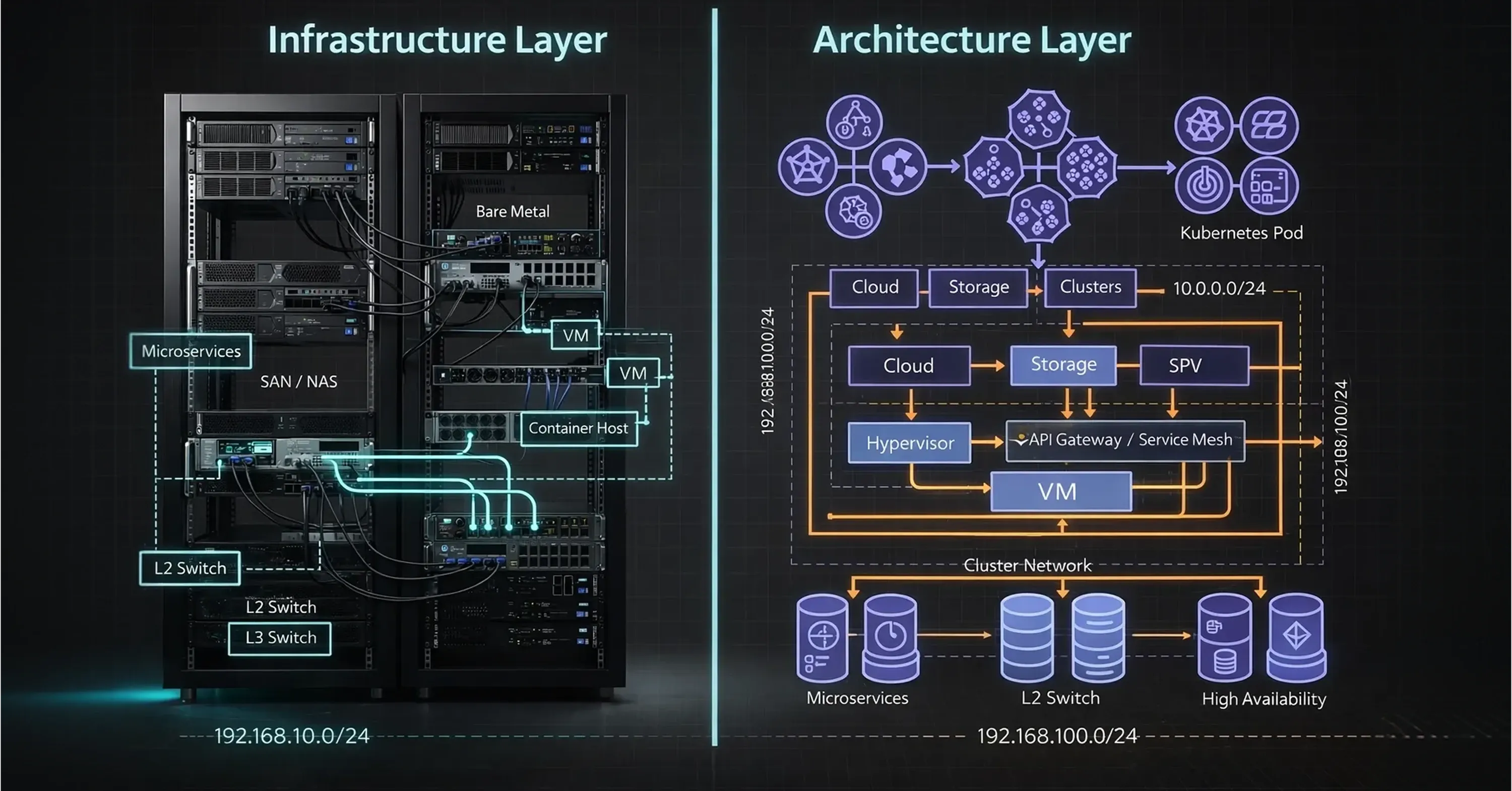
Diagram showing infrastructure and architecture layers with servers, virtual machines, Kubernetes pods, cloud storage, and microservices networking

It is common to hear "infrastructure" and "architecture" used interchangeably, but they represent two distinct concepts in the technology stack. Understanding the difference is vital for effective communication between business leaders and technical teams.

Infrastructure is the collection of tools and resources - the raw materials. It includes the servers, storage drives, and network cables (or their virtual equivalents) that you rent from a provider. Architecture, on the other hand, is the blueprint or design of how these materials are arranged to solve a specific business problem. You can have the best infrastructure in the world, but if the architecture is poorly designed, the system will be slow or insecure.

Key distinctions include:

  • Focus: Infrastructure focuses on the what (assets and resources), while architecture focuses on the how (design and logic).

  • Responsibility: Infrastructure is often managed by the cloud provider (in public clouds), while architecture is the responsibility of your internal engineers or partners.

  • Flexibility: Infrastructure components are generally standardized, whereas architecture is highly customized to the application's needs.

Building a House

Think of cloud infrastructure as the lumber, concrete, piping, and wiring available at a supply store. Anyone can buy these materials. Cloud architecture is the blueprint an architect draws to build a specific house using those materials. Two companies might rent the same AWS or Azure infrastructure (the lumber), but one builds a high-security banking fortress while the other builds an open-concept public blog (the architecture).

A clear architecture ensures that the infrastructure is used efficiently. It prevents waste and ensures that the system is resilient enough to handle failures without crashing the entire business operation.

Cloud Delivery Models: IaaS, PaaS, and SaaS

Once you understand the components, the next step is choosing how you want to consume them. Cloud services are delivered in three primary layers, often described as a pyramid. At the bottom is Infrastructure as a Service (IaaS), which offers the most control, while Software as a Service (SaaS) sits at the top offering the most convenience.

Infrastructure as a Service (IaaS) is the model closest to the hardware. You rent the raw compute, network, and storage, and your team is responsible for installing the operating system and software. It is highly popular for organizations needing deep control; in fact, the global IaaS public cloud market grew by 22.5% in 2024, reflecting a strong shift toward this flexible model.

Platform as a Service (PaaS) removes the need to manage the operating system. It provides a platform for developers to build and deploy applications without worrying about software updates or security patches for the underlying servers.

Software as a Service (SaaS) is a fully managed application accessed via a web browser. You do not manage the underlying infrastructure or the platform; you simply use the software.

  • IaaS: You manage the server, OS, and data (e.g., Amazon EC2, Google Compute Engine).

  • PaaS: You manage the data and application code (e.g., Heroku, Google App Engine).

  • SaaS: You manage only your login and personal settings (e.g., Gmail, Salesforce).

To get acquainted with essential IaaS providers, architecture patterns, and the practical differences between the major service models, see Top Cloud Sources Every Business Should Know.

A Growing E-commerce Startup

An e-commerce startup begins by using Shopify (SaaS) to sell products quickly because it requires zero setup. As they grow and need a custom inventory system, they might use Google App Engine (PaaS) to write their own code without managing servers. Eventually, they need total control over their data for compliance, so they migrate their core database to virtual machines on Microsoft Azure (IaaS).

Selecting the right model depends on how much control you need versus how much management overhead you want to avoid. Most modern enterprises use a mix of all three.

The Shared Responsibility Model

Moving to the cloud does not mean outsourcing all responsibility. One of the most critical concepts for decision-makers to grasp is the Shared Responsibility Model. This framework defines who is responsible for which security tasks, ensuring there are no gaps that attackers could exploit.

The cloud provider is responsible for security of the cloud. This includes protecting the physical data centers, the hardware, and the software layer that creates virtual machines. You, the customer, are responsible for security in the cloud. This includes your customer data, encryption, identity management (who has passwords), and network firewall configurations.

For further guidance on how the shared responsibility model works, and operational best practices organizations can employ to ensure robust security in the cloud, see Is Your Legacy Firewall Exposing Your Cloud? Cloud Security in Information Security.

Common divisions of labor include:

  • Physical Security: The provider handles guards, cameras, and locks at the data center.

  • Data Encryption: You are responsible for encrypting sensitive data before it is stored.

  • User Access: You control who has administrative rights to your systems.

  • Patching: In IaaS, you patch the OS; in PaaS/SaaS, the provider handles it.

A Misconfigured Database

Imagine a company rents storage space in the cloud to store customer records. The cloud provider ensures the hard drives are not stolen and the power stays on. However, the company’s IT admin accidentally leaves the storage bucket "public," meaning anyone on the internet can read it. When a data breach occurs, it is the company’s fault, not the provider's. The provider secured the infrastructure, but the customer failed to secure the access settings.

Understanding where the line is drawn prevents negligence. Many organizations partner with a leading provider of managed IT services to bridge this gap, ensuring that their side of the shared responsibility - configuration, monitoring, and compliance - is handled by experts. (Learn more about secure cloud strategies for hybrid environments in Cloud Managed Security: Unified Security Strategy for Cloud and Hybrid Enviroinments.)

Deployment Models: Public, Private, and Hybrid

After deciding on the delivery model and understanding security duties, you must decide where your cloud environment will live. This is known as the deployment model. The choice depends on regulatory requirements, performance needs, and budget.

Public Cloud is where resources are owned and operated by a third-party provider and shared among multiple organizations (tenants). It is cost-effective and highly scalable. Private cloud refers to resources used exclusively by a single organization. This can be physically located at your on-site data center or hosted by a third-party service provider. It offers greater control and privacy.

Hybrid Cloud combines public and private clouds, bound together by technology that allows data and applications to be shared between them. This approach is dominating the market; recent data shows that 88% of cloud buyers are deploying or operating a hybrid cloud, and 90% of organizations will adopt hybrid cloud by 2027.

To better understand compliance, data residency, and the business drivers behind hybrid and sovereign clouds, see The Sovereignty Shift: Navigating Data Residency and Corp IT Solutions in a Borderless Cloud.

Factors driving these choices include:

A Financial Services Firm

A bank uses a hybrid strategy to balance innovation with security. They use a private cloud to store sensitive customer checking account data, ensuring it never leaves their secure perimeter. However, they use the public cloud to run their customer service chatbot and mobile app interface, allowing them to handle millions of user interactions simultaneously without overloading their private servers.

This hybrid approach allows businesses to keep critical data secure while leveraging the immense power of public cloud networks for customer-facing applications.

The Consumption-Based Model: CapEx vs. OpEx

One of the most transformative aspects of cloud computing is the shift in how technology is paid for. Traditionally, IT infrastructure required massive upfront Capital Expenses (CapEx). You had to buy servers, cooling systems, and software licenses before you even onboarded a single customer.

Cloud infrastructure introduces an Operational Expense (OpEx) model. You pay only for the resources you consume, typically on a monthly basis. This eliminates the need for forecasting hardware needs three to five years in advance. If you need more storage, you pay for it; if you delete data, your bill goes down.

If your organization is evaluating cloud financial models and cost control, you'll benefit from reading The Cloud Cost Paradox: Why Migration Spikes Your Budget - And How a FinOps Solutions System Fixes It.

Key financial impacts include:

  • Cash Flow: Capital is preserved for core business activities like R&D or marketing rather than depreciating hardware.

  • Risk Reduction: There is no risk of over-provisioning (buying too much hardware) or under-provisioning (buying too little and crashing).

  • Transparency: Modern tools allow for granular tracking of exactly which department or project is generating costs.

A Seasonal Tax Firm

A tax preparation firm is extremely busy from January to April but quiet the rest of the year. In a CapEx model, they would have to buy enough servers to handle the April rush, leaving that expensive equipment idle for eight months. With a consumption-based cloud model, they spin up hundreds of virtual servers during tax season and shut them down in May, drastically reducing their annual IT spend.

This shift allows startups to compete with enterprises, as they get access to the same high-performance infrastructure without the million-dollar entry ticket.

Benefits of Using Cloud Services

The transition to cloud infrastructure is not just about saving money on hardware; it is about fundamentally improving how a business operates. The combination of IaaS, hybrid deployment, and OpEx spending creates a powerful engine for growth.

The primary benefits include:

  • Scalability: Resources can be scaled up or down instantly (elasticity) to match demand.

  • Reliability: Cloud providers offer redundant backups across multiple geographic zones, reducing the risk of data loss.

  • Agility: New applications can be deployed globally in minutes, accelerating time-to-market.

  • Cost Efficiency: Organizations avoid the hidden costs of maintaining on-premise data centers, such as electricity, cooling, and physical security.

For practical advice on building resilient cloud environments and why scalability is a pillar of modern IT strategy, read Breaking the Infrastructure Bottleneck: The Cloud Solution Behind a Unified Approach.

Disaster Recovery

A logistics company based in Florida previously hosted all their servers in their Miami headquarters. A hurricane threat meant they had to physically shut down operations. After migrating to the cloud, their infrastructure is now hosted in data centers in Virginia and Ohio. If a hurricane strikes their headquarters, their digital operations continue without interruption, and employees can work remotely from safe locations.

By modernizing infrastructure, companies ensure they are resilient against disruptions and ready to seize new opportunities.

Challenges of Cloud Infrastructure

Cloud adoption delivers significant advantages, but it also introduces new complexities that organizations must manage carefully. One common challenge is cost unpredictability, as pay-as-you-go pricing can lead to unexpected bills without proper monitoring. Security misconfigurations remain another major risk, especially when teams lack cloud expertise. Additionally, companies may face vendor lock-in, compliance constraints, or performance issues caused by network latency. Addressing these challenges requires strong governance, skilled personnel, and continuous optimization.

Common Use Cases

Cloud infrastructure supports a wide range of business scenarios across industries. Organizations commonly use it to host web and mobile applications, scale e-commerce platforms during peak demand, and run data analytics or AI workloads. It is also widely adopted for disaster recovery, backup storage, and development/testing environments where rapid provisioning is essential. By enabling remote access to systems, cloud infrastructure further supports distributed teams and global operations.

Best Practices for Adoption

Successful cloud adoption begins with a clear strategy aligned with business objectives rather than a purely technical migration. Organizations should implement governance frameworks, security controls, and cost management processes early in the transition. Designing systems for resilience, automation, and scalability helps avoid future rework. Continuous monitoring of performance and spending, combined with training for internal teams, ensures long-term value from cloud investments.

Conclusion

Cloud infrastructure has evolved from a novel alternative to the standard operating model for modern business. By understanding the distinctions between infrastructure and architecture, utilizing the right delivery models like IaaS, and leveraging the flexibility of hybrid deployments, leaders can position their organizations for long-term success. Whether you are a startup founder looking to minimize upfront costs or an IT director aiming to modernize legacy systems, the cloud offers the tools to build resilient, scalable, and efficient operations.

The main difference is the level of management required. With Infrastructure as a Service (IaaS), you rent the basic building blocks like servers and storage, but you must manage the operating system and applications yourself. With Software as a Service (SaaS), the provider manages everything, including the application, and you simply log in to use it (like Gmail or Salesforce).

Not necessarily, but it offers more control. Public cloud providers invest billions in security, often exceeding what a single company can afford. However, private cloud allows an organization to physically isolate its data, which may be required for strict compliance or regulatory reasons. Security ultimately depends on how well the environment is configured, regardless of deployment model.

Hybrid cloud is popular because it offers the "best of both worlds." It allows companies to keep sensitive, regulated data on a private cloud or on-premise server for security, while simultaneously using the public cloud for high-volume tasks, software testing, or handling traffic spikes. This flexibility makes it ideal for enterprise businesses.

Scaling refers to the ability to increase or decrease IT resources based on demand. "Vertical scaling" means adding more power (RAM/CPU) to an existing server, while "horizontal scaling" means adding more servers to spread out the workload. Cloud infrastructure allows this to happen automatically and instantly, ensuring performance never suffers during busy periods.

The primary advantage is scalability and flexibility - organizations can quickly provision or reduce computing resources on demand without investing in expensive physical hardware, paying only for what they actually use.

Schedule a Meeting

Book a time that works best for you and let's discuss your project needs.

You Might Also Like

Discover more insights and articles

A futuristic DevSecOps cybersecurity concept visualizes secure software development with digital shields, data streams, and integrated security workflows.

DevSecOps Explained: How to Build Security into Every Stage of Development

Software moves quickly, yet attackers move even faster. The longer a vulnerability stays hidden in code, the more expensive it becomes to fix, and the greater the damage to customer trust. The solution is DevSecOps: weaving security into the entire delivery pipeline instead of bolting it on at the end. The rest of this article shows engineering leaders and security professionals exactly how to make that shift left without slowing release velocity.

A futuristic data operations center visualizes interconnected digital systems, analytics dashboards, and real-time network intelligence in a high-tech workspace

Cloud Cost Optimization: How to Cut Costs and Improve Cloud Performance

Worldwide spending on public cloud reached $723.4 billion in 2025, yet 84% of companies say keeping that bill under control is their biggest headache. This guide shows how engineering and FinOps teams can move from merely spending less to spending smart - without throttling innovation.

A futuristic neon-lit digital tunnel represents advanced AI infrastructure, high-performance computing, and data center technology

What Does a DevOps Specialist Do? Roles, Skills, and Responsibilities Explained

Dev & Ops used to sit in separate corners of IT, but organisations now realise that rapid software delivery depends on tight collaboration. That shift has created a new role: the devops specialist. Yet job ads rarely spell out what the title really means, which tools matter, or how it differs from traditional system administration. This article gives recruiters, career changers, students, and IT professionals a clear, authoritative look at the day-to-day life, skills, and responsibilities of a DevOps specialist.

A business team collaborates in a modern office surrounded by AI-driven data analytics dashboards, visualizing real-time performance metrics at sunset

How to Build a CI/CD Pipeline from Scratch: A Step-by-Step Guide

A working ci/cd pipeline is the shortest route from an idea on your laptop to running code in production. Yet many teams still push code manually, risking broken builds, slow releases, and sleepless nights.

This guide shows you how to replace guesswork with a repeatable delivery machine. You will walk through every stage—Source, Build, Test, and Deploy—using familiar tools such as GitHub Actions, Jenkins, and GitLab CI as reference points. By the end, you will know exactly what to set up, why it matters, and how to keep the flow smooth and secure.