Overview
We will start by unpacking the devsecops meaning and why “shifting left” has become essential. Next, we will walk through the technical building blocks of a secure pipeline, discuss tool integration that preserves CI/CD speed, and outline the cultural changes that turn DevOps security into a team sport. Along the way, real-world examples will keep the discussion grounded. By the end, you will know how to measure success, reduce remediation costs, and protect brand reputation.
Why Shifting Left Matters for Software Security
Moving security activities earlier in the software development life cycle (SDLC) is called shifting left. The goal is simple: catch flaws when they are cheapest to fix, typically during coding or build stages.
A 2024 study found that 37 % of DevSecOps practitioners cited protecting sensitive information as the top testing priority. Sensitive data is often mishandled because security checks happen too late, after the code that leaks it has already shipped.
Shifting left benefits include:
-
Lower cost per bug: Fixing a defect in production can cost 15–30 times more than fixing it during coding.
-
Faster incident response: Issues are found during automated tests, not after customers complain.
-
Better compliance posture: Early checks generate auditable artifacts, easing regulatory reporting.
If early security is so valuable, why do teams delay it? Common blockers are fear of slowing releases, lack of expertise, and alert fatigue from low-quality findings.
For security to stick, it must be invisible to developers whenever possible and produce high-confidence results.
Real-time scanning, actionable feedback, and clear remediation guidance are the foundation. The next section explains the components that deliver those outcomes.
However, shifting left is only one side of a complete DevSecOps strategy. Security does not end at deployment. Modern DevSecOps programs also embrace “shielding right” - ensuring applications remain protected in production environments.
This includes Runtime Application Self-Protection (RASP), which embeds security controls directly into running applications to detect and block threats in real time. When suspicious behavior is identified in production, the pipeline should feed into automated incident response workflows, triggering alerts, rollbacks, or containment actions without manual delay.
By combining shift-left practices with runtime protection and automated response, organizations establish continuous security coverage across the entire software lifecycle.
Core Components of a DevSecOps Pipeline
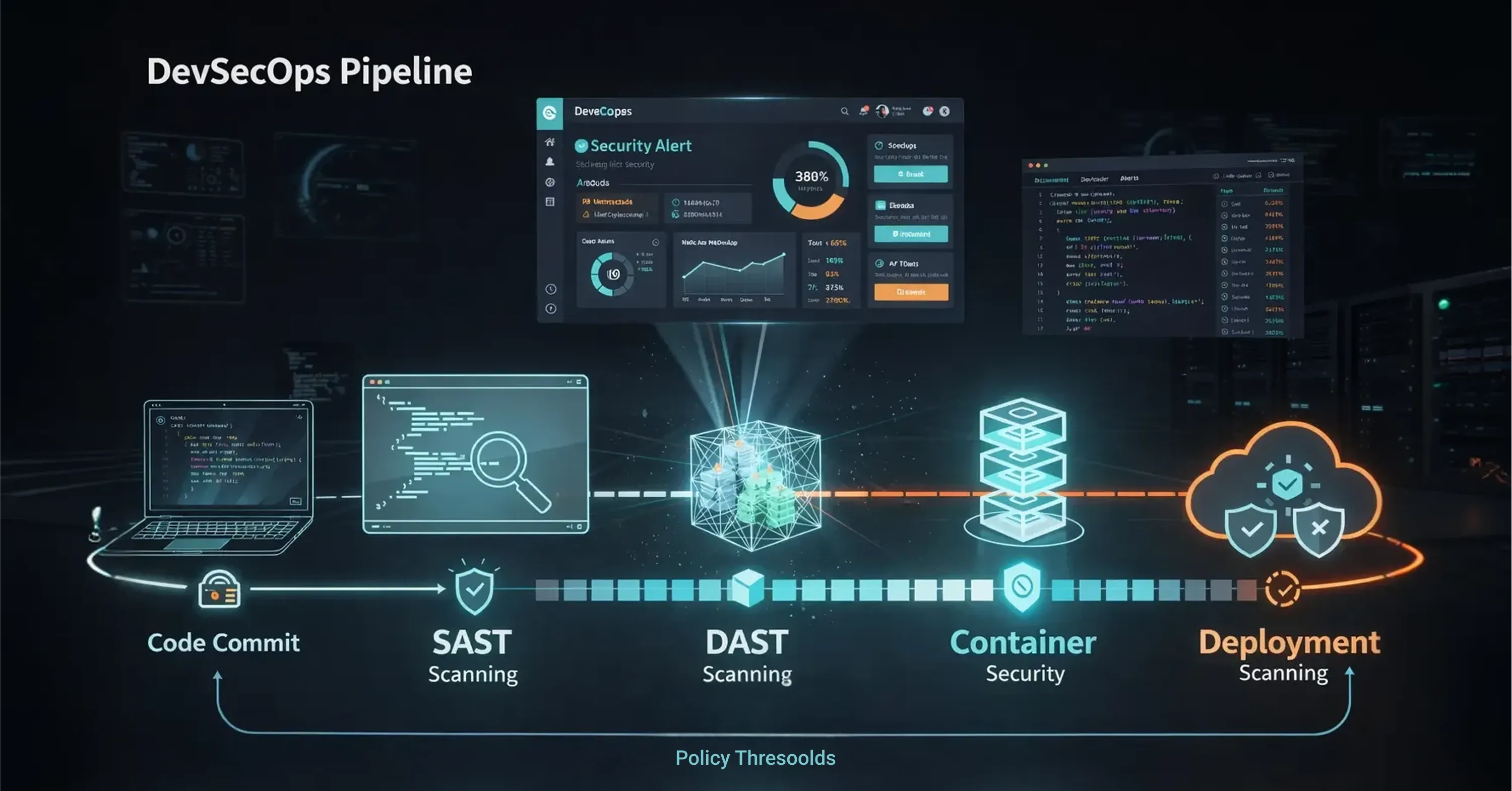
A robust pipeline layers multiple security gates that map to each CI/CD phase.
-
Pre-commit hooks: Lightweight linters and secret scanners run locally before code is pushed.
-
Build stage: SAST analyzes source code and dependency management tools flag known CVEs (Common Vulnerabilities and Exposures).
-
Test stage: Dynamic Application Security Testing (DAST) attacks a running build, while container scanners validate base images.
-
Deploy stage: Infrastructure-as-Code (IaC) policies verify cloud templates, and runtime protection tools monitor behavior post-deploy.
-
Feedback loop: Findings feed into defect trackers and dashboards, closing the loop with developers.
These gates should be automated and policy-driven. Manual reviews remain for design-level threats, but machines handle the repetitive work.
Securing the Software Supply Chain
Modern applications are often composed of 70–80% third-party and open-source components. While dependency scanners help identify known CVEs, scanning alone is not sufficient for mature DevSecOps practices.
Teams should automatically generate and continuously audit Software Bills of Materials (SBOMs) to track exactly what components, versions, and transitive dependencies are included in each release. An SBOM provides full visibility into software composition, strengthens supply chain security, and enables rapid response when new vulnerabilities are disclosed.
To orchestrate the pipeline, teams often rely on platform engineering or managed services. Maintaining a custom security stack is resource-intensive, so many high-growth organizations choose to offload the underlying “plumbing” of the pipeline - infrastructure management, cloud configuration, and security tooling - to specialized providers. This allows internal development teams to focus on feature code and product innovation rather than maintaining complex security infrastructure.
For guidance on practical implementation and reducing compliance overhead through automation, see Tech-Driven DevOps: How Automation is Changing Deployment.
Preventing Cloud Misconfigurations Before Deployment
A logistics company used Infrastructure-as-Code templates in Terraform but lacked policy checks. By adding an open-source IaC scanner to its pipeline, misconfigured S3 buckets were blocked during pull requests, eliminating a class of data exposure incidents they had previously faced in production.
Even small, targeted controls at each stage sharply cut risk.
Integrating Security Tools Without Slowing CI/CD

Engineering leaders worry that security tools slow builds. This does happen when scans are poorly tuned, redundant, or produce excessive false positives. Noisy results drain developer attention. Recent research shows 60% of respondents report that 21%–60 % of their security test results are noise.
To keep pipelines fast:
-
Run the right test at the right time: quick SAST on every commit, deeper scans nightly.
-
Use incremental scanning: analyze only changed files rather than the entire repository.
-
Set policy thresholds: fail the build only for critical findings, log informational issues for later.
-
Centralize alerts: aggregate results in a single dashboard to avoid context switching.
Performance tuning is not one-and-done. Monitor job durations, optimize scanners, and archive historical metrics to prove that security adds minimal overhead.
For a deeper dive on how automated CI/CD pipelines enable both speed and reliability, see CI/CD Automation: How CI/CD Pipeline Automation Powers Modern Software Delivery.
Faster Builds Through Smarter Scanning
An e-commerce retailer reduced build times from 18 to 11 minutes by switching its container scanning from full image scans to layer-based differential scans that skipped unchanged layers. Security coverage remained identical, while developers reclaimed valuable time.
Culture and Collaboration: Making DevOps Security Everyone’s Job
Tools alone cannot achieve DevOps security. The organization must adopt a mindset that places shared accountability for risk.
Start with clear, measurable goals that both DevOps and security teams own, such as “critical vulnerabilities must be fixed within 48 hours.” Empower developers through security training so they understand how exploits work, not merely how to silence alerts.
Practical steps include
-
Security champions embedded in each squad, acting as first responders.
-
Gamified learning like capture-the-flag events to build skills.
-
Blameless retrospectives after incidents, focusing on process fixes rather than finger-pointing.
AI is changing the picture, too. 78% of survey respondents said they are currently using AI in software development or plan to within the next 2 years yet only 24% feel very confident in their testing of AI-generated code. That gap underscores the need for teams to collaborate on guardrails that cover AI-assisted commits.
AI Governance and LLM Scanning
By 2026, DevSecOps must explicitly account for AI-assisted development. This includes implementing LLM scanning controls to detect hallucinated packages, insecure prompts, and unsafe code patterns introduced by generative models.
AI-generated code can unintentionally replicate vulnerable “copy-paste” patterns from outdated training data or suggest dependencies that do not exist. Mature DevSecOps programs treat AI-generated output like any other untrusted input - subjecting it to SAST, DAST, dependency scanning, and policy enforcement before deployment.
Organizations that fail to introduce AI governance risk introducing vulnerabilities at scale without realizing it.
If you want to learn about building collaboration and observability into modern DevOps, check out From Code to Customer: Accelerating Innovation with Cloud DevOps.
Building Security Ownership Through Informal Collaboration
A SaaS provider instituted a weekly “Security Café” where developers could bring questions to security engineers over coffee. Within three months, pull requests that included their own remediation for discovered flaws rose by 40 %, showing a cultural shift toward ownership.
Measuring Success and Reducing Remediation Costs
You cannot improve what you do not measure. Track leading indicators tied to business impact, not only raw vulnerability counts.
Key metrics
-
Mean time to remediate (MTTR): time from detection to fix.
-
Percentage of critical issues found pre-production: higher is better.
-
Build-time increase: keep under an agreed threshold, often 10 %.
-
False-positive rate: aim for continual reduction.
Dashboards that map technical metrics to dollars saved help justify ongoing investment. For example, a drop in MTTR from five days to one day may translate to avoided breach costs and higher customer satisfaction scores. Learn more about how managed IT services can provide the monitoring and reporting infrastructure you need in Cloud Support: How Managed DevOps Keeps Your Business Online 24/7.
Incentives Drive Faster Remediation
A fintech scale-up tied MTTR metrics to quarterly bonuses. Within two quarters, MTTR for high-severity bugs fell 68%, directly correlating with fewer support tickets and a visible uptick in app store ratings. By continuously measuring and iterating, teams keep security improvements aligned with delivery speed and customer value.
What Is DevSecOps and How Does It Work?
DevSecOps is the practice of embedding automated security checks, policies, and collaboration into every phase of the software delivery pipeline, enabling teams to identify and fix vulnerabilities during coding, building, testing, and deployment without slowing release velocity.
Conclusion
Building security into every stage of development is no longer optional. By shifting left, layering automated checks, fostering a collaborative culture, and tracking metrics that matter, organizations deliver software that is both fast and resilient. For further details on embedding security into your SDLC, see The Managed DevOps Cheat Sheet: how to cut App Development Time and Costs by 80% about devops technology. DevSecOps turns security from a bottleneck into a competitive advantage - protecting customers, budgets, and brand reputation all at once.