Overview
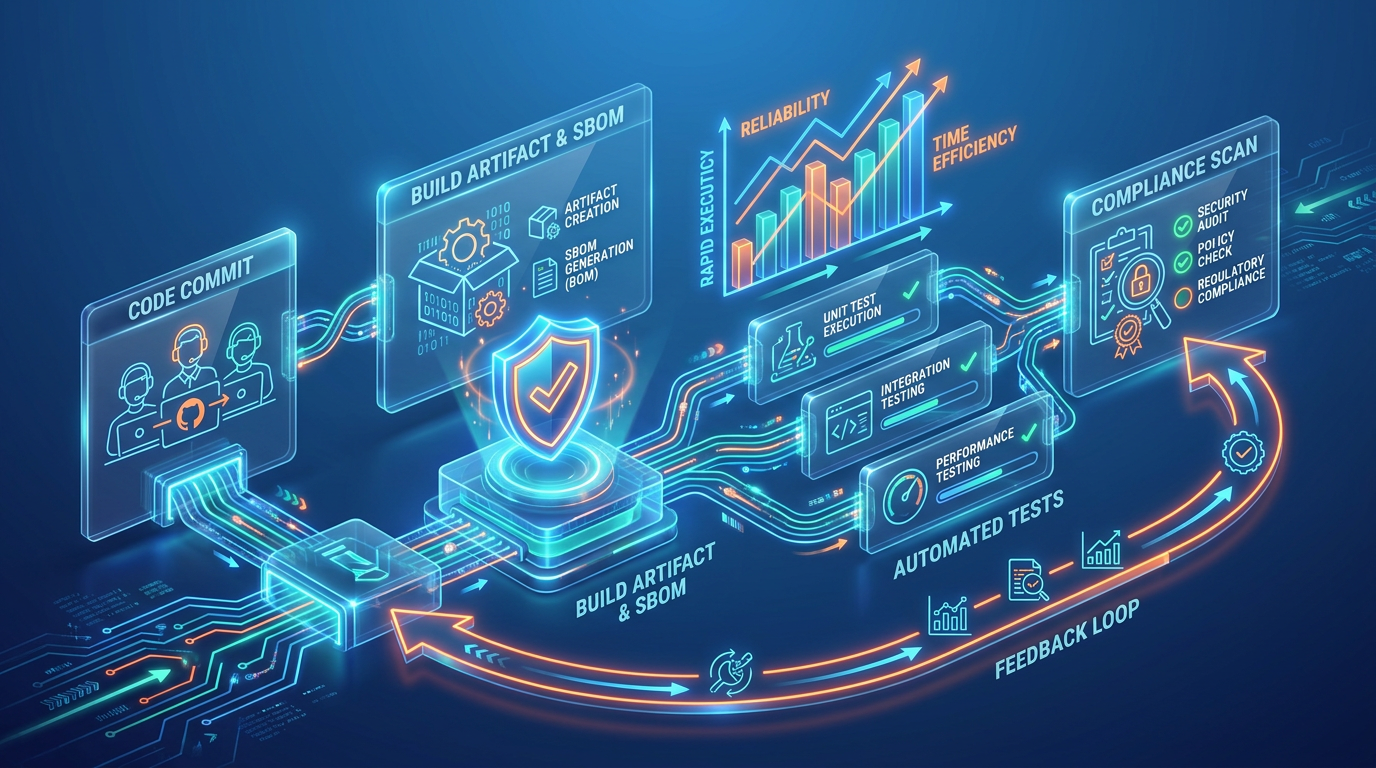
Most CI/CD pipelines start fast and break slowly. Teams ship a working pipeline in week one, then spend the next six months patching it as complexity grows, teams multiply, and edge cases pile up. This article gives you a framework for building pipelines that hold up - fast to implement, easy to maintain, and designed to scale without a full rebuild. You will learn the core building blocks of a production-ready pipeline, how to avoid overengineering early on, and which design decisions reduce friction across the entire delivery lifecycle.
Whether you are a DevOps engineer, a cloud architect, or an engineering leader, this is the guide for getting it right the first time. That said, not every team has the bandwidth to build and maintain this infrastructure in-house. If your engineers are already stretched across delivery, adding pipeline ownership on top creates real risk. For teams in that position, working with a managed services provider is not a shortcut - it is a deliberate decision to protect delivery speed without burning out the people responsible for it.
Start With the Right Foundation, Not the Perfect One
The biggest mistake teams make is treating pipeline setup as a one-time architecture project. They spend weeks designing elaborate multi-stage workflows before a single line of application code runs through them. Efficiency starts with a different mindset: ship a working pipeline fast, then iterate.
A strong initial foundation includes just a few essentials:
-
Source control integration with automatic triggers on push or merge
-
An automated build stage that compiles, packages, and produces a consistent artifact
-
At least one layer of automated testing, even if it is just unit tests
-
A deployment step to at least one environment, ideally using infrastructure as code
That is enough to start delivering value. Canary deployments, parallel test suites, and multi-region rollouts can be layered in later. The point is to reduce the feedback loop between code commit and deployment as early as possible. Mature teams track this loop through deployment frequency and lead time for changes. According to the 2025 Accelerate State of DevOps Report by Google and DORA, elite performers deploy on demand with lead times under one hour - and they deploy 182 times more frequently than low performers, with 127 times faster lead times for changes.
What teams typically underestimate is the ownership question. Someone needs to own the pipeline as a product from day one, not as a side project. Without that, you get a working pipeline in week one and a rotting one by month three. If your organization does not yet have a platform engineering function, assign a named owner. This person does not need to be full-time on pipeline work, but they need explicit responsibility for its health.
Scaling a Minimal CI/CD Pipeline Without Rebuilding It
A mid-sized fintech team adopted this approach by launching a minimal pipeline using GitHub Actions with a single build-test-deploy workflow targeting a staging environment. Within two weeks, they had automated what previously took a full day of manual steps. Over the next quarter, they added integration tests, security scans, and production deployment gates, all without rebuilding the pipeline from scratch.
This foundation sets the stage, but a pipeline is only as reliable as the artifacts and tests it produces. For a more hands-on, tool-agnostic roadmap that illustrates these stages, you can explore How to Build a CI/CD Pipeline from Scratch: A Step-by-Step Guide.
Build Traceable Artifacts and Automate Testing Early

A pipeline that builds code but cannot tell you exactly what was built, when, or from which commit is a liability. Traceability is not a luxury. A well-structured build pipeline must produce traceable artifacts, generate Software Bills of Materials (SBOMs), and automate testing to ensure deployed systems are consistent and verifiable. This matters for compliance, for day-to-day debugging, and for rollback confidence.
SBOMs deserve specific attention here. With AI-generated code now entering codebases through tools like Copilot and ChatGPT, the provenance of dependencies is harder to track than ever. An SBOM generated at build time gives you a machine-readable inventory of every component in your artifact. When a CVE drops for a transitive dependency, you can query your SBOMs across services and know within minutes which deployments are affected. Without them, you are grepping through lock files and hoping for the best. On the testing side, automation should be a first-class citizen from day one.
You do not need 100% coverage immediately, but you do need a strategy:
-
Unit tests run on every commit to catch regressions early
-
Integration tests validate that services communicate correctly
-
Security and compliance scans should be introduced as automated gates, not manual reviews
The goal is to catch problems before they reach production without slowing down the pipeline to a crawl. Parallelizing test stages and caching dependencies are simple optimizations that keep things moving. Track your pipeline's own performance: if your build-plus-test cycle exceeds 10 minutes, developers will start batching commits and you lose the fast feedback loop that makes CI valuable.
Here is what commonly goes wrong. Teams add tests but never maintain them. Flaky integration tests accumulate. Within a few months, developers reflexively re-run failed builds instead of investigating. The test suite becomes a rubber stamp. To prevent this, treat test reliability as a metric. Track your test pass rate over time, and quarantine flaky tests immediately rather than letting them erode trust in the pipeline.
Standardize and Scale With Reusable Templates
Here is where many organizations hit a wall. Pipeline number one works great. Pipeline number fifteen is a mess of copy-pasted YAML files with subtle differences across teams. Standardization is what separates a fast setup from a scalable one.
Reusable pipeline templates, whether through GitHub Actions composite actions, GitLab CI includes, or Jenkins shared libraries, allow teams to inherit a proven workflow and customize only what they need. This is the core idea behind golden paths in platform engineering: provide a paved road that is easy to follow, so teams spend their time on application logic instead of pipeline plumbing. Done well, this cuts setup time for new projects from days to hours.
Key principles for scaling pipelines include:
-
Define common stages (build, test, scan, deploy) in shared templates
-
Use infrastructure as code tools like Terraform or Pulumi for environment consistency
-
Enforce naming conventions and tagging standards across all pipelines
-
Centralize secrets management and access controls
Telecom companies offer a useful reference here. Operating a complete CI/CD pipeline integrated with modern DevOps application management models is now a recommended strategy for improving efficiency and reducing risk at scale across large, complex organizations.
Organizations like ABS, a leading provider of managed IT services and cloud computing solutions, help teams implement these kinds of structured, scalable pipeline designs, ensuring that automation frameworks are built for both immediate speed and sustained operational performance. If you are unsure whether your current pipeline architecture can hold up as your team grows, an external audit is often the fastest way to find out. [Talk to the ABS team →]
The trade-off with standardization is flexibility. Teams that need to do something unusual, a GPU-accelerated build, a specialized compliance gate, will push against the template. Plan for this by designing templates with clear extension points rather than rigid structures. If the template cannot be extended, teams will fork it, and you are back to the copy-paste problem.
The ownership shift matters here too. When you centralize pipeline templates, the platform engineering team (or whoever owns them) becomes a dependency for every shipping team. That team needs to treat templates as a product: versioned, documented, with a deprecation policy. Otherwise, a breaking change to a shared template at 2 PM on a Tuesday becomes an incident for every team in the organization.
From 30 Pipelines to One Standard: How a Healthcare SaaS Team Cut Onboarding Time by 93%
A healthcare SaaS company maintained over 30 microservices, each with its own pipeline configuration. After migrating to a shared template model, new service onboarding dropped from three days to under two hours, and pipeline-related incidents fell by more than half, measured by a reduction in change failure rate from 22% to 9%.
Standardization handles the structural side of scaling, but a truly efficient pipeline also needs protection against the risks that come with speed.
Embed Security and Observability Into the Pipeline
Speed without guardrails is just a faster way to ship problems. Automation is fundamental to enforcing security policies at different phases of the development lifecycle, and organizations should map security automation use cases to each stage: code, build, package, deploy, and operate.
This does not mean adding a heavy approval process to every commit. It means:
-
Running static analysis and dependency vulnerability scans automatically during the build phase
-
Applying policy-as-code (tools like Open Policy Agent or Kyverno) to validate infrastructure changes before deployment
-
Scanning container images for known CVEs and blocking promotion to production if critical vulnerabilities are found
-
Using sprint-based onboarding approaches with proprietary accelerators across parallel workstreams for privileged access management, reducing security risk without stalling delivery
-
Monitoring pipeline performance itself: build times, failure rates, and deployment frequency
One area most teams neglect is runtime protection. Pre-deploy scanning catches known vulnerabilities, but it cannot detect exploitation of zero-days or logic flaws in production. Runtime Application Self-Protection (RASP) adds a layer that monitors application behavior during execution and blocks attacks in real time. If your pipeline deploys to production multiple times per day, the window between a vulnerability shipping and a patch deploying is narrow, but not zero. RASP covers that gap.
AI-generated code introduces another dimension of risk. LLM-assisted coding tools can produce code that looks correct but contains subtle vulnerabilities: insecure deserialization, improper input validation, dependency confusion. Your pipeline should include LLM-aware scanning rules, and your team should treat AI-generated pull requests with the same (or higher) scrutiny as human-written code. This is not theoretical. Dependency confusion attacks have already exploited auto-suggested package names from code assistants.
Machine identities are also multiplying. Every pipeline, every service account, every cloud function that authenticates to another service uses a credential. Without automated rotation and lifecycle management for these identities, your pipeline's security posture degrades as you scale. Centralize machine identity management and audit it continuously.
Observability closes the loop. If you cannot see where your pipeline is slow, flaky, or failing, you cannot improve it. Treat pipeline metrics with the same seriousness as application metrics. Track mean time to recovery (MTTR) for pipeline failures, not just application incidents. DORA data suggests elite teams maintain MTTR under one hour. If a broken build takes your team half a day to diagnose and fix, that is a signal your pipeline observability is insufficient.
Build automation guardrails that prevent cascading failures: automatic rollback triggers when error rates spike post-deploy, drift detection that flags when deployed infrastructure diverges from its declared state, and deployment freezes that activate during active incidents. These are not optional for teams deploying frequently. They are the difference between fast delivery and fast chaos. For technical guidance on embedding these guardrails and the operational benefits of pipeline observability, see Tech-Driven DevOps: How Automation is Changing Deployment.
Scanning, Dashboards, and Six Hours Saved Per Sprint: A Logistics Team's Pipeline Fix
A logistics company integrated automated container image scanning into its build stage and added pipeline dashboards tracking MTTR. Within one quarter, the team identified and eliminated two recurring deployment failures that had been costing roughly six hours per sprint, cutting their change failure rate from 18% to under 10%.
For practical frameworks that help unify observability, security, and compliance in your monitoring strategy, see CI/CD Monitoring: Continuous Monitoring for Performance, Security, and Compliance.
What Makes a CI/CD Pipeline Truly Efficient?
An efficient CI/CD pipeline minimizes manual intervention across the software delivery lifecycle, from code commit to production deployment. It combines automated building, testing, security scanning, and deployment into a repeatable workflow. But efficiency is not just about speed. It is about reducing friction: fewer failed deployments, less time spent debugging pipeline issues, clearer accountability for what shipped and when.
The cost dimension matters too. As you scale pipelines, compute costs grow. Apply FinOps thinking to your CI/CD infrastructure. Track cost per build and cost per deployment. Use spot instances for test runners where job interruption is tolerable. Teams that ignore pipeline costs often discover their CI/CD compute bill rivals their production infrastructure spend. To integrate FinOps principles and optimize your cloud spend as part of CI/CD, explore The Cloud Cost Paradox: Why Migration Spikes Your Budget - And How a FinOps Solutions System Fixes It.
Your Next Move
If you already have a CI/CD pipeline in place, the next step is not rebuilding it. It is evaluating whether it can scale reliably as delivery demands grow.
Start with four areas:
-
Measure delivery performance. Track deployment frequency, change failure rate, and MTTR. If these metrics are difficult to access, your observability layer needs improvement.
-
Validate artifact traceability. Every production deployment should map back to a specific commit, build, and test result set. If that visibility is missing, prioritize SBOM generation and artifact tagging.
-
Review pipeline standardization. Excessive pipeline variations across teams create operational friction. Consolidate repetitive workflows into reusable templates with controlled extension points.
-
Strengthen security controls. Build-time scanning alone is no longer enough. Add runtime protection, automated policy enforcement, and security checks designed for AI-assisted development workflows.
High-performing engineering organizations treat CI/CD pipelines as long-term operational infrastructure, not temporary automation scripts. The teams that invest in scalable pipeline architecture consistently deliver software faster, recover from failures more efficiently, and maintain stronger deployment reliability as systems grow.
If working through this list surfaces more gaps than your team can close alone, that is a signal worth taking seriously. ABS works with engineering teams to assess, redesign, and manage CI/CD infrastructure - so your team can focus on shipping product instead of maintaining the system that ships it. [Get in touch →]
Final Thoughts
The teams that struggle with CI/CD are rarely struggling with the technology. They are struggling with the decisions made before the first pipeline ran - overengineered from the start, under-owned from day one, and never designed to scale. The teams that get it right start simple, iterate fast, and treat the pipeline as infrastructure worth maintaining. They instrument it, secure it, and standardize it before the complexity forces them to.
Speed without that foundation is just a faster path to failure.
If your pipeline cannot tell you what was deployed, when, from which commit, and whether it passed every gate - it is not finished. That is where to start.