Security Awareness Training: Reducing Human Risk in Cybersecurity

Content authorBy Irina BaghdyanPublished onReading time10 min read
Title:
Security Awareness Training: Reducing Human Risk in Cybersecurity

Meta description:
Use security awareness training so you reduce risky clicks and get faster reports from your team.

Article:

This article explains why employee behavior stays risky even after a security awareness training rollout, and how to design an effort that shifts habits instead of filling a compliance log. It walks through the behaviors that create exposure and pairs each with a practical response you can put in place without a dedicated security team.

Why people are the weak point

You already know the pattern. The breach that hurts your organization starts with a person, and the numbers back that instinct up. The Verizon 2026 Data Breach Investigations Report found that 60% of breaches involved a human element, whether a click or data sent to the wrong address.

Here's why that share stays high. Filters and endpoint tools have improved faster than human habits, so attackers go where the defenses are thinnest. The thinnest point is the person at a keyboard. The person is under pressure. They're distracted by competing priorities and rushed, which is when predictable mistakes happen. The argument this article defends is simple: reducing human risk depends on changing behavior. What follows is a map of the behaviors that expose you and the security awareness training and policy responses that actually move them.

Why most training fails

If you rolled out an annual training video and saw nothing change, you didn't do it wrong. That result is the norm, and the reason sits in how people make decisions. Security awareness training transfers knowledge in a quiet moment, but the risky decision happens later, under cognitive load, when a message demands an answer in seconds. Knowledge and behavior split apart the moment the workday gets busy, which is exactly when it counts.

The box-ticking trap makes this worse. A completion log satisfies an auditor and tells you nothing about whether anyone will pause before clicking. Then there's memory itself. Research based on Hermann Ebbinghaus's forgetting curve suggests people lose about 50% of new information within 24 hours and up to 90% within a week when nothing reinforces it. So the content you paid for is mostly gone by Thursday.

Habituation finishes the job. When the same banner warns an employee on every external email, the warning stops registering. It becomes wallpaper. Repeated reminders that never change get filtered out by the brain the way you stop hearing a fan running in the background. That's the gap between doing training and reducing risk, and it's why activity and outcomes are not the same thing.

The behaviors that create risk

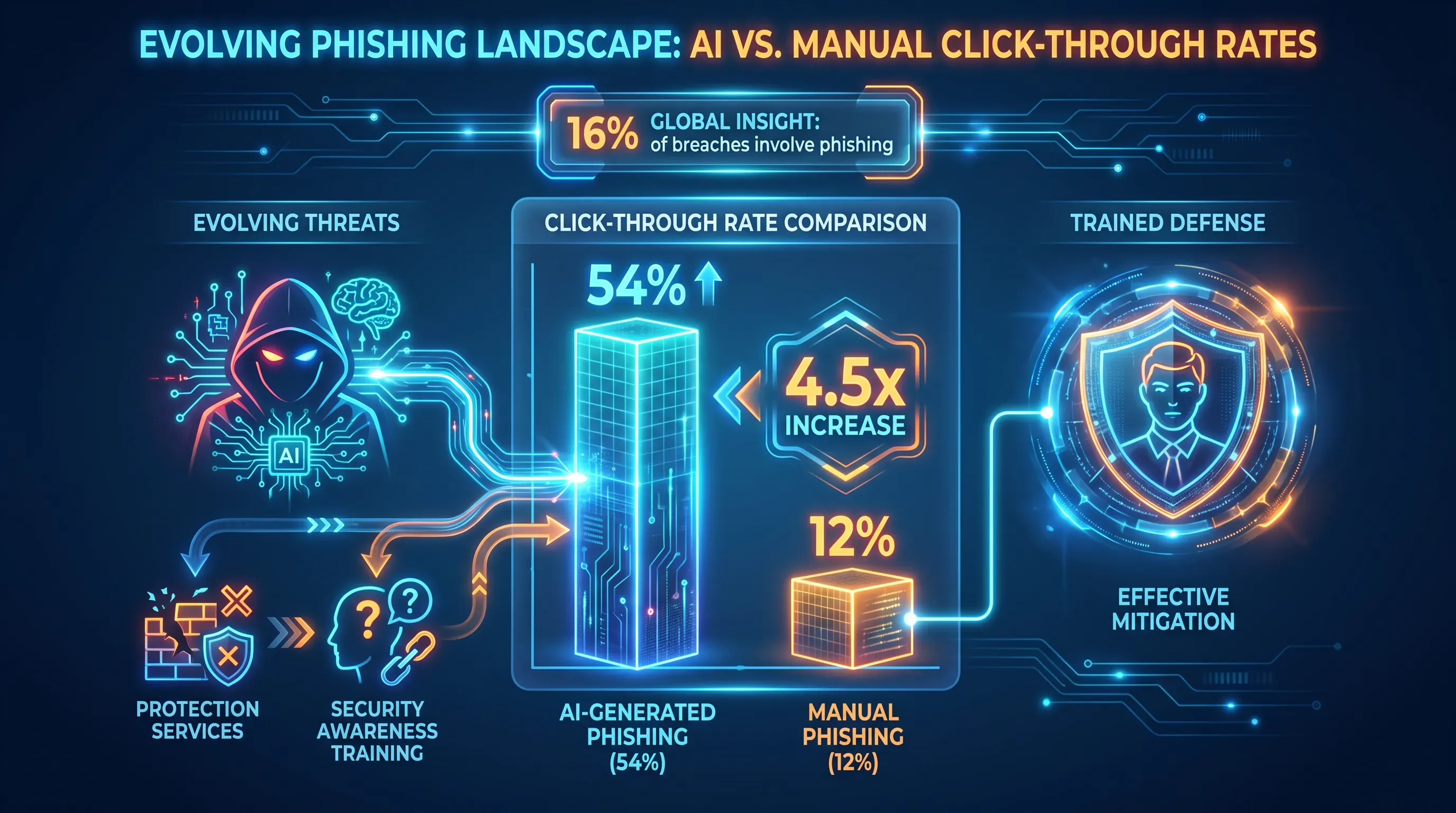
A vibrant neon infographic comparing AI-generated (54%) and manual phishing (12%) click-through rates on a deep blue gradient background.

Risk clusters around a handful of recurring habits, and once you can name them, you can address each one directly. The subsections below cover why capable people fall into the behaviors that open the door and the harm each one enables.

Falling for phishing

Phishing is still the front door. It appeared in 16% of confirmed breaches in the Verizon 2026 DBIR and has held its place as the most common pathway in for years. Careful people click when a message arrives under time pressure or uses the name of a boss or a known vendor, because deference to authority is normal social behavior.

The old advice about typos and clumsy formatting no longer holds. Microsoft's 2025 Digital Defense Report measured a 54% click-through rate for AI-generated phishing against 12% for manually written attempts, a 4.5x jump. AI produces clean, personalized messages at scale, which strips away the tell-tale signs trained employees learned to look for. Because the threat keeps changing, a one-time security awareness training lesson goes stale fast. This is where phishing protection services earn their place because they filter what they can so trained people face fewer decisions. But phishing protection services support judgment, since no filter catches everything.

Need IT Support?

Book a free consultation with ABS Technologies experts we'll help you find the right managed IT, cloud, or security solution for your business.

Book a Free Consultation

Weak password habits

The everyday password failures are familiar: reuse across accounts and shared logins on small teams where one credential floats between people. These habits persist because good password behavior feels like friction. Every unique, complex password is one more thing standing between someone and the task they're trying to finish.

The consequence arrives later, from somewhere else. When a breach at another company leaks credentials, attackers replay those username and password pairs against your accounts, a technique called credential stuffing. Akamai counted 26 billion credential stuffing attempts every month in its 2024 report, and credential abuse was the initial access vector in 22% of breaches per the Verizon 2026 DBIR. One reused password becomes an account takeover. The practical fixes, password managers and multi-factor authentication, come later in this article.

Ignoring malware warnings

Malware gets in through ordinary actions. Someone downloads an attachment they didn't vet or clicks straight through a security warning to get a task done. The prompt feels like an obstacle because habituation plus workload means it barely registers before the mouse moves to "proceed."

The stakes for a small organization are existential. Ransomware appeared in 44% of breaches in the Verizon 2026 DBIR, and average recovery costs for small businesses could run up to millions. Add extended downtime and lost customers, and a single incident can end the business. Prevention is a mix of trained caution and technical guardrails that take the risky option off the table before anyone has to decide.

Not reporting incidents

The most damaging behavior is silence. After an employee clicks something and senses it was wrong, fear or uncertainty keeps them silent. That delay is the whole problem. The Verizon 2025 DBIR found the median time from phishing delivery to a click is 21 seconds, while the median time to report it is 28 minutes. Attackers get a head start measured in real damage.

A blame-heavy culture guarantees under-reporting, because nobody volunteers for punishment. As Hoxhunt's human risk team put it: "A click isn't a failure, but following it up with silence is." That silence turns a small mistake into a major breach, which makes reporting a behavior your program has to design for on purpose. The next section is about exactly that.

Building a reporting culture

Under-reporting traces back to fear and a lack of psychological safety. Amy Edmondson, the Harvard professor who defined the term, describes psychological safety as the belief that you won't be punished or humiliated for speaking up about a mistake. Without it, people hide clicks. With it, they raise their hand fast enough for you to act.

Building that culture is concrete work, and it comes down to a few moves:

  • Give people one obvious reporting channel, such as a report button in email or a single address everyone knows.

  • Acknowledge every report quickly, so the person hears back with a clear response.

  • Treat a reported click as a success worth thanking someone for.

Punitive approaches stay popular because they feel decisive, and 81% of security professionals in SoSafe's Human Risk Review still believed reprimanding users changes behavior. The behavioral science disagrees. Positive reinforcement strengthens habits faster and holds longer than punishment, which mostly teaches people to go quiet. The payoff justifies the effort: a workforce that reports turns every employee into an early-warning sensor. The Verizon 2026 DBIR found that recently trained employees report phishing at 21%, four times the 5% rate of untrained staff, which is the difference between catching a campaign early and finding out after the damage is done.

Need IT Support?

Book a free consultation with ABS Technologies experts we'll help you find the right managed IT, cloud, or security solution for your business.

Book a Free Consultation

Policies that support behavior

Written policies give people a default to fall back on when they're unsure. That matters because most bad outcomes come from split-second judgment calls made without a clear rule to lean on. A short policy answers the question before the employee has to guess, which removes the moment where mistakes live.

The policies worth drafting first are the ones that touch daily work:

  1. Password and MFA requirements that state what's mandatory and where.

  2. An acceptable use policy covering personal devices and unapproved software.

  3. A defined incident response path so people know who to tell and how.

Policies only work when they're short and enforced. A ten-page document nobody reads protects no one. Keep each policy to a plain-language page and hold people to it consistently, or the whole thing becomes theater. This is also where business email compromise protection lives. For business email compromise protection, a payment verification step uses a second channel to confirm any change to bank details or wire instructions, which stops the fraud that targets finance and executive staff. That matters because business email compromise protection addresses a threat that cost victims billions across tens of thousands complaints. A simple callback rule is business email compromise protection that costs nothing and stops a wire from leaving.

Designing security awareness training that works

Everything above points to one shift: move from the one-off annual session to ongoing, behavior-first security awareness training delivered in short doses that fit the workday. The annual video fails because it fights the forgetting curve and never reinforces anything. Frequent micro-lessons work with how memory actually operates. A SANS Institute study found organizations using regular microlearning saw 45% fewer security incidents than those relying on annual training alone.

The ingredients that make security awareness training change behavior come straight from the failures described earlier:

  • Realistic phishing simulations that let people practice the decision, since knowledge learned in a quiet room doesn't transfer to a busy inbox on its own.

  • Role-specific content for higher-risk staff like finance and executives, who face targeted business email compromise protection scenarios the average employee never sees.

  • Reinforcement spread over time, because a single exposure fades within days.

  • Behavior measurement that shows whether anything actually moved.

Good security awareness training also treats reporting as the goal. Frequency drives the result: quarterly programs produce roughly a 7% reporting rate, while continuous micro-learning pushes that toward 60% after a year. Timing matters as much as content. Start planning this with short lessons and regular simulations, with phishing protection services layered underneath to reduce the volume that reaches people at all. Pairing phishing protection services with practice gives trained employees fewer and clearer decisions to make.

Measuring real change

The whole argument rests on measurable behavior, so you need behavior-based signals. Completion percentages tell you people watched a video. They say nothing about risk. The metrics that matter show whether habits are actually shifting.

Watch these:

  • Falling phishing simulation click rates over successive campaigns. Webroot's data shows click-through rates dropping below 5% after a year of ongoing security awareness training, roughly a 70% reduction.

  • Rising and faster incident reporting, since a shorter gap between click and report is what limits the damage.

  • Fewer repeat mistakes from the same people, because a small group of users drives most of the risk.

Start with a baseline. Run one phishing simulation before you change anything, then track the click rate and the reporting rate against that baseline every quarter. That gives you a real story to bring leadership: "clicks fell from 30% to 6% and reports rose fourfold." Numbers like those defend the program and justify its cost far better than a full compliance log ever will.

Where to start

The human problem is behavior under pressure. Lasting change comes from habits and reinforcement over time. Begin with a first measurable move.

Start with three steps. Run a baseline phishing test so you know where you actually stand. Draft the two policies that matter most, password and MFA rules plus a payment verification step. Then set up one easy reporting channel and thank the first person who uses it. Handling cloud architecture and security guardrails is the work ABS Technologies does every day. If you'd rather hand off the setup than learn it the hard way, book a free consultation with ABS Technologies to build your security awareness training foundation. →

Need IT Support?

Book a free consultation with ABS Technologies experts we'll help you find the right managed IT, cloud, or security solution for your business.

Book a Free Consultation

Yes, you can run a basic program with one assigned owner and a simple quarterly schedule. Start with a report mailbox, a password manager rollout, MFA checks, and one phishing simulation per quarter. ABS Technologies can help configure email reporting, MFA, and cloud security guardrails if your team lacks time.

Run phishing simulations at least quarterly, then test high-risk roles monthly if they handle payments or executive communication. Rotate the scenarios so employees practice different decisions. Give a short lesson right after a missed simulation, because that timing connects the mistake to the correct action.

Acknowledge the report, then check whether anyone clicked the same message or entered credentials. Block the sender or domain, remove matching emails from inboxes, and reset passwords if needed. After that, share a short note explaining what made the message risky.

Yes, contractors need training when they access company systems, data, or email. Keep it focused on their access level, but include reporting steps, MFA rules, and data handling expectations. Remove their access as soon as the contract ends, because unused accounts create avoidable risk.

Cyber insurance applications often ask for evidence of security awareness training, phishing testing, MFA, and incident response procedures. Requirements differ by insurer, so ask for the control list in writing before renewal. Keep completion records, policy versions, and test results ready for review.

Schedule a Meeting

Book a time that works best for you and let's discuss your project needs.

You Might Also Like

Discover more insights and articles

Title:
Cloud Readiness Assessment: How to Know If Your Business Is Ready to Migrate

Meta description:
Use this cloud readiness assessment guide to see if you can migrate safely and identify gaps befo

Cloud Readiness Assessment: How to Know If Your Business Is Ready to Migrate

This article is a practical guide to running a cloud readiness assessment before you move any workload off your current setup. It walks through what to audit and how to reach a clear verdict on your business's migration readiness.

Title:
Vulnerability Management Services: Finding Security Weaknesses Before Attackers Do

Meta description:
See how vulnerability management services help you find weak spots before attackers and dec

Vulnerability Management Services: Finding Security Weaknesses Before Attackers Do

This article explains what vulnerability management services do and how they help you find security weaknesses before an attacker exploits them. It walks through how vulnerability management services handle the full lifecycle of finding and fixing weaknesses, with priority and monitoring built into that cycle, then shows where a managed service fits and how to judge one provider against another.

Title:
Server Management Services: Keeping Critical Business Systems Reliable

Meta description:
See how server management services help you find upkeep gaps and keep business systems dependable.

Art

Server Management Services: Keeping Critical Business Systems Reliable

This article explains what server management services actually cover and how the individual disciplines connect into systems you can depend on. It walks through the core server-maintenance disciplines so you can audit your own environment and see which areas are handled well and which are quietly exposing the business.

Title:
Automating IT Scaling: The Future of Elastic Infrastructure

Meta description:
Discover unclustered methods to automate your IT scaling so you can reduce cloud waste and maintain speed under he

Automating IT Scaling: The Future of Elastic Infrastructure

Automated scaling turns capacity management from a human-triggered task into a continuous system that watches live conditions and allocates resources in real time according to policy. It reads signals like latency and queue depth, then adds or removes capacity in seconds. That shift makes infrastructure respond at machine speed instead of ticket speed.