Overview
Cloud migration can feel overwhelming - too many tools, too much data, too much at stake. But with the right roadmap, it becomes a predictable, secure step toward faster operations and smarter scaling. This guide shows how to move to on-cloud solutions with confidence, protect your data at every stage, and avoid the costly mistakes most companies make.
Step 1: The Pre-Migration Audit
Before you move a single file, you need a full picture of what you actually have - otherwise you’ll drag years of digital junk into the cloud. A quick pre-migration audit shows which tools are still useful, which need updates, and how much data you truly need to move.
- Inventory applications: List every software tool your team uses daily.
- Check dependencies: Note which programs need to "talk" to each other to work.
- Assess hardware: specific physical servers that can be retired after the move.
- Identify compliance needs: Flag data that requires special legal handling.
Real-World Example: The Cluttered Server Room
A mid-sized logistics company had a server room full of old drives they were afraid to touch. During their audit, they realized 30% archiving this data was from archived projects over ten years old that no longer needed immediate access. By archiving this data separately before the move, they reduced their required storage space and saved thousands of dollars in monthly fees.
For organizations seeking scalable infrastructure and tailored guidance, explore Be Cloud: The Next-Gen Platform for Scalable Business to learn about the technical building blocks that support modern migrations.
Step 2: Choosing Your Cloud Strategy
Once you know what you have, you need to decide where it will go. Not all clouds are the same, and picking the right environment depends on your specific business needs. You generally have three choices: public cloud (shared resources like Amazon or Google), private cloud (dedicated resources just for you), or a hybrid approach.
Recent trends show that most businesses prefer mixing these options. In fact, 88% of cloud buyers were deploying or operating a hybrid cloud in late 2024. A hybrid model allows you to keep sensitive data on a private server while using the public cloud for less critical tasks like email or file sharing.
- Public Cloud: Cost-effective and scalable; great for general business apps.
- Private Cloud: Higher security and control; ideal for sensitive financial or legal data.
- Hybrid Cloud: A mix of both; offers flexibility and security where you need it most.
For insights on best practices in configuring hybrid and multi-cloud environments and why the right strategy is crucial for both agility and compliance, read about the unified approach to breaking infrastructure bottlenecks.
Step 3: Migration & Data Transfer (The Move)

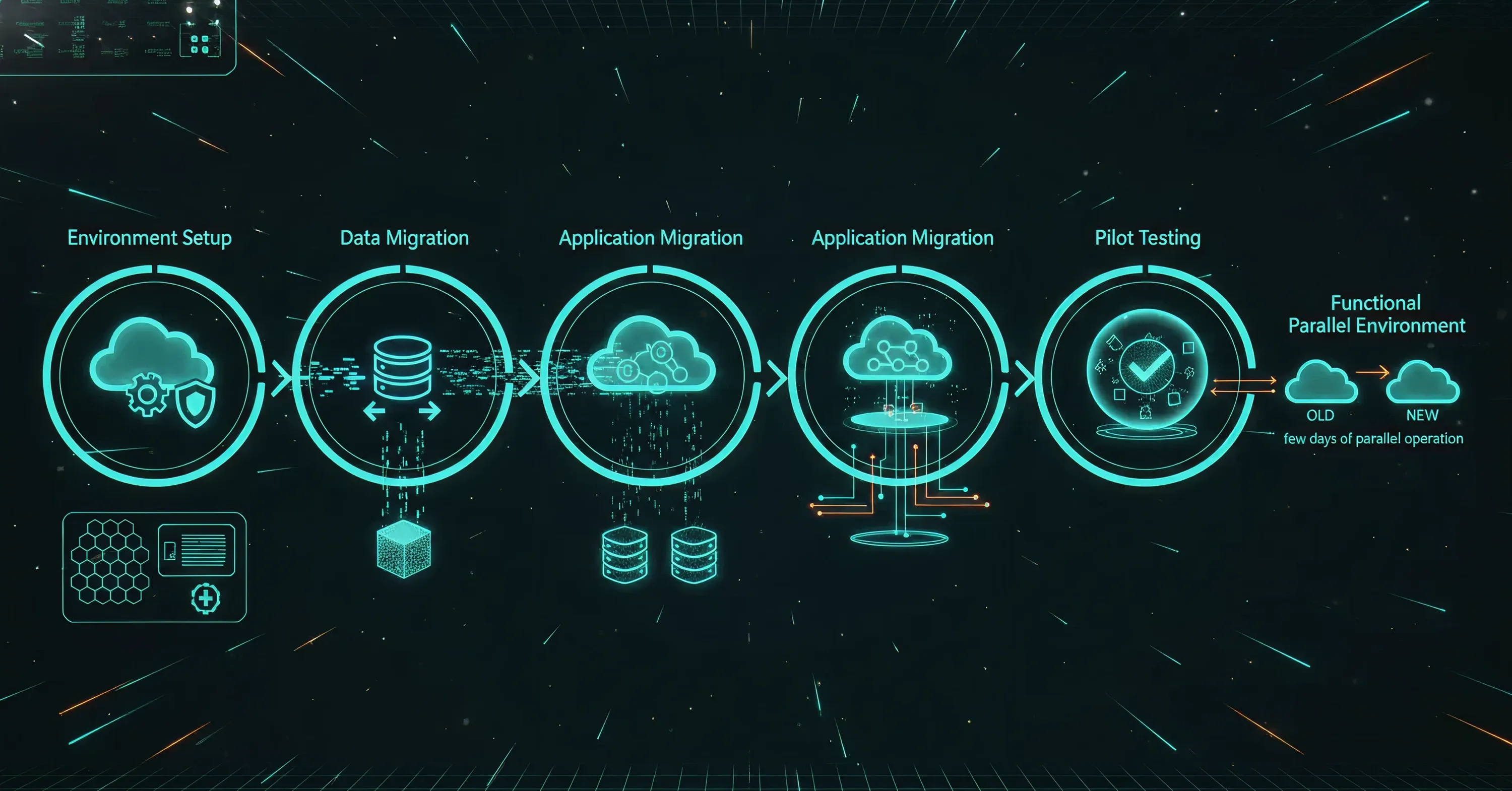
Once your cloud environment is defined, it’s time for the actual move. This phase focuses on preparing the landing zone, transferring data securely, and validating performance before switching fully to the new system.
- Environment Setup: Setting up the AWS/Azure/Google Cloud landing zone (Identity management, billing alerts).
- Data Migration: Moving static data first (databases, files).
- Application Migration: Moving the actual services.
- Testing (Pilot): Moving non-critical workloads first to test connectivity.
- Deliverable to Client: A functioning environment (usually running parallel to the old one for a few days).
To see how outside experts and mature cloud operational support can accelerate migration projects and reduce risk, see our Industries coverage.
Step 4: Prioritizing Data Integrity and Backups
The biggest fear during migration is losing data. To prevent this, you must establish robust data backup protocols before, during, and after the move. Data integrity simply means ensuring that the data you move arrives in the exact same condition as it left, without corruption or errors.
Backup is becoming a top priority for businesses everywhere. Analysts predict that 75% of enterprises will prioritize backup of SaaS applications as a critical requirement by 2028. You cannot rely solely on the cloud provider to save you; you need your own independent copies of your data.
- The 3-2-1 Rule: Keep three copies of data, on two different media types, with one offsite.
- Test your backups: Verify that you can actually restore files from your backup before moving.
- Encryption: Scramble data during the transfer so it is unreadable if intercepted.
For a detailed overview of modern backup strategy and disaster recovery plans—including immutable backups and rapid incident root cause analysis - review the "Cloud Support: How Managed DevOps Keeps Your Business Online 24/7" guide.
Step 5: Security and Compliance Integration
Security in on-cloud solutions operates differently than in an office server room. You are no longer securing a physical door; you are securing digital identities. You must ensure that only the right people can access your data and that you meet all industry regulations regarding privacy.
With the worldwide public cloud market forecast to reach $723.4 billion in 2025, attackers are increasingly targeting cloud environments. Implementing strong access controls, like Multi-Factor Authentication (MFA), is essential. MFA requires a user to provide two forms of identification (like a password and a code sent to their phone) before logging in.
- Identity Access Management (IAM): strict rules on who can access what files.
- Data Encryption: ensure data is encrypted both at rest (stored) and in transit (moving).
- Compliance checks: verify the cloud setup meets standards like HIPAA or GDPR.
For an in-depth breakdown of building a resilient, unified security posture - covering managed firewalls, centralized monitoring, disaster recovery, and compliance for cloud and hybrid environments - see Cloud Managed Security: Unified Security Strategy for Cloud and Hybrid Enviroinments.
Step 6: Minimizing Downtime and Validation
The final step is the actual switch. Your goal is to migrate with minimal interruption to business operations. This often involves a "phased cutover," where you move systems one by one rather than all at once. After the move, you must rigorously test everything to ensure it works as expected.
Testing is not just about checking if the files are there; it is about performance. You need to verify that applications load quickly and that data saves correctly. This validation phase proves that your on-cloud solutions are ready for daily use.
- Pilot testing: Move a small, non-critical workload first to test the process.
- Performance checks: Ensure speeds are comparable to or better than your old system.
- User acceptance: Have key staff members try out the system and report issues.
- Go-live support: Have IT support on standby for the first few days of operation.
If you want to see how continuous monitoring, predictive maintenance, and disaster recovery play a crucial role in ensuring uptime and resilience following cloud migrations, explore "Cloud Support: How Managed DevOps Keeps Your Business Online 24/7".
What are on-cloud solutions?
On-cloud solutions refer to computing services - including servers, storage, databases, networking, software, and analytics - delivered over the internet ("the cloud"). Instead of owning and maintaining physical data centers and servers, companies rent access to these technology services from a cloud provider. This model offers faster innovation, flexible resources, and economies of scale.
Conclusion
Cloud migration doesn’t have to feel like a jump into the unknown. With the right plan - and a strong data backup strategy - the whole process becomes a clear, manageable upgrade. Prepare well, protect your data, and you’ll unlock faster, more flexible operations with confidence. For a deeper look at building a secure, scalable cloud foundation, explore Be Cloud: The Next-Gen Platform for Scalable Business.