Server Management Services: Keeping Critical Business Systems Reliable

Content authorBy Irina BaghdyanPublished onReading time11 min read
Title:
Server Management Services: Keeping Critical Business Systems Reliable

Meta description:
See how server management services help you find upkeep gaps and keep business systems dependable.

Art

This article explains what server management services actually cover and how the individual disciplines connect into systems you can depend on. It walks through the core server-maintenance disciplines so you can audit your own environment and see which areas are handled well and which are quietly exposing the business.

Why server reliability matters

You know the moment. A shared drive stops responding, and the line-of-business app hangs; within a few minutes half the office is standing at your desk asking if it's back yet. Server management services exist to prevent exactly that kind of morning, because a server is the shared backbone that connects the people who depend on your company's data and applications. When it stutters, everyone feels it at once.

Downtime has a concrete cost. ITIC and Calyptix's 2025 SMB security survey of over 700 firms found that some small businesses report downtime costs exceeding $100,000 an hour. Lost productivity is only part of it. There's missed revenue while orders can't process, and there's exposed data when a neglected system becomes the way attackers get in.


Reliability is a set of ongoing disciplines, and each one slips the moment nobody owns it. That's the real problem this article helps you solve.

Reliability is a set of ongoing disciplines, and each one slips the moment nobody owns it. That's the real problem this article helps you solve.

What server management services cover

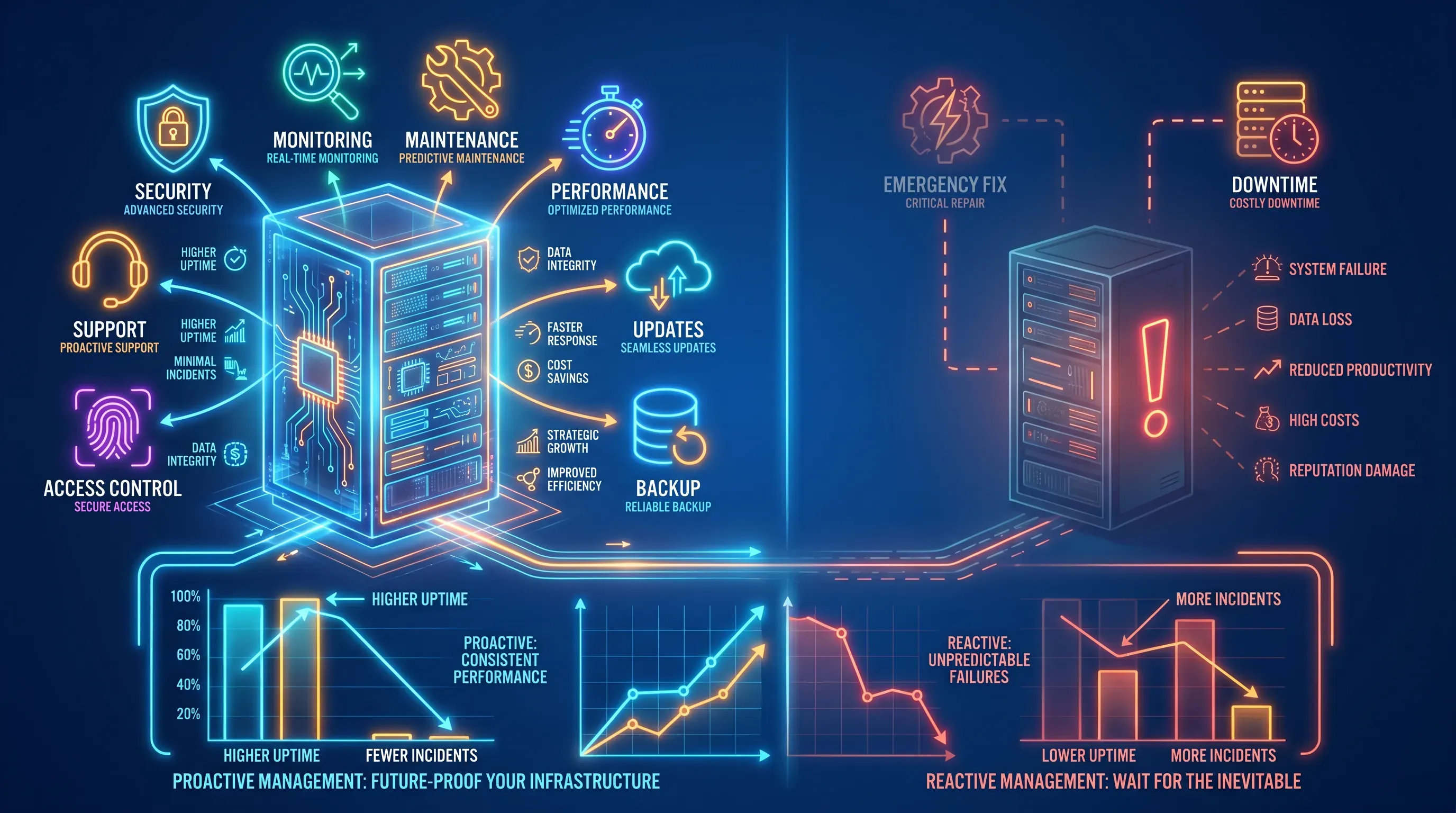
A neon hi-tech infographic comparing proactive and reactive server management, featuring vibrant servers and icons with glowing effects.

Server management services cover the continuous upkeep that keeps hardware and software in working order across the full life of a server while protecting security and availability. The work behind server management services is the steady, unglamorous maintenance that protects you because it happens whether or not anything is on fire.

Most small teams run in reactive mode without meaning to. A patch gets applied after a vulnerability makes the news. A backup gets checked after a file goes missing. Monitoring means someone noticing the app is slow. That approach works right up until the day it doesn't, and the gap between those two states is where the damage lives.

A provider of server management services brings a proactive, always-on model instead. The same categories of work get handled on a schedule by people whose full-time job is watching for problems before they surface. Here is the scope in one place:

  • Performance tuning and capacity planning so systems stay responsive under load

  • Patching and updates for operating systems and installed software

  • Backup and recovery that is verified and restorable

  • Access control over privileged logins and the permissions tied to user accounts

  • Continuous monitoring and production support services that catch issues early

The rest of this article takes each of these apart so you can hold it against your own setup.

Core tasks in managed server services

Reliability comes from several separate jobs done consistently, and server management services split the daily work into distinct disciplines for that reason. A server can be perfectly patched and still fall over from a capacity problem. It can have flawless backups and still get breached through a stale admin account.

The subsections below explain what each discipline involves and how neglecting it hurts the business. Read them as an audit. For each one, ask a plain question about your own environment: is this actually being handled, or has it quietly become a gap?

Performance and uptime

Performance work keeps servers responsive and available under load. It covers configuration tuning and capacity planning for resources like memory and disk so growth doesn't outrun the hardware. This is the discipline behind the difference between an application that opens instantly and one that makes staff wait every time they click.

The part that surprises people is that it's continuous. A server tuned perfectly at deployment drifts as data grows with the user base and new software loads onto it. Capacity that was comfortable in January is tight by autumn. Day to day, uptime depends on resource trend reviews that reveal bottlenecks early and show when to add headroom before demand overwhelms the server.

When this slides, you get the symptoms your staff already complain about. Reports that time out. An accounting package that freezes at month-end when everyone hits it at once. And eventually an outage that traces back to a disk quietly filling for weeks with nobody watching the trend line.

Need IT Support?

Book a free consultation with ABS Technologies experts we'll help you find the right managed IT, cloud, or security solution for your business.

Book a Free Consultation

Patching and updates

Patching means applying updates to the operating system and installed software to close security holes and fix bugs before they cause a breach or an outage. It sounds simple. In practice it's one of the first things to slip, because applying a patch takes time nobody has and carries a small risk of breaking something that currently works.

So patches wait. That delay is where the danger concentrates. Exploitation of vulnerabilities has become the most common way attackers get in for the sixth year running, and the timeline has flipped entirely: Mandiant's 2026 frontline incident data found attackers are now weaponizing flaws an average of seven days before a patch is even available, not after. Attackers move faster than a busy IT team catching up on maintenance between other fires.

Good patch management is scheduled and tested. Updates get validated against a staging environment before they touch production, so a bad patch doesn't take down the systems it was supposed to protect. That discipline is harder to keep in-house because it demands dedicated attention on a regular cadence, and postponing patches to avoid disrupting operations is a common, well-documented tradeoff IT teams make under pressure.

Backup and recovery

Having backups and being able to recover are two different things, and the gap between them is where businesses get caught. Backup readiness means the backups are current and verified through restores into a working system when you need them. A backup job that reports success has confirmed only that data was written somewhere, which is not the same as confirming you can get it back.

The numbers here are sobering. Veeam's 2025 Ransomware Trends and Proactive Strategies Report, which surveyed organizations that had actually been attacked, found that only 10 percent recovered more than 90 percent of their data and 57 percent recovered less than half. An untested backup is a false sense of security, because you find out it doesn't work at the worst possible moment.

Recovery planning limits the damage from ransomware and from ordinary failures such as a server outage or a deleted folder. And ransomware makes this urgent: Veeam's 2024 Ransomware Trends Report found attackers targeted backup repositories in 96 percent of attacks and succeeded 76 percent of the time. Ask yourself one question about your own setup. When was the last time someone actually restored from your backups to prove they work? If the answer is "never" or "I'm not sure," that's your gap.

Access control

Access control governs who can touch critical systems by managing privileged logins and the permissions tied to user accounts. Done well, it reduces two risks at once: honest mistakes from people with more access than they need, and breaches that spread because a compromised account can reach everything.

The idea underneath it is least-privilege access, which means each account gets only the permissions the person's actual job requires and nothing extra. You understand accounts already. The discipline is rigorous enforcement of the right access level for each account, even when admin rights would be faster. That shortcut compounds. Varonis's 2025 State of Data Security Report, which analyzed real data from 1,000 organizations, found that 90 percent had sensitive files exposed to every employee through Microsoft 365 Copilot alone, averaging 25,000 exposed folders per organization.

Why this ties directly to reliability: most breaches need a door left open. Verizon's 2026 Data Breach Investigations Report found that the human element was present in 62 percent of breaches, whether through a mistake, a phishing click, or stolen credentials. Tight access control limits how far any single mistake or stolen credential can travel through your systems.

Need IT Support?

Book a free consultation with ABS Technologies experts we'll help you find the right managed IT, cloud, or security solution for your business.

Book a Free Consultation

Monitoring and production support services

Continuous monitoring watches server health through performance and security signals so problems get caught and fixed before they become outages. Monitoring flags a disk-capacity trend days before the server stops. An alert fires the moment a service goes down, before users need to call.

Round-the-clock production support services matter because servers fail on their own schedule. A backup job breaks at 2 a.m. A resource spike hits over a holiday weekend. If nobody is watching at those hours, a small issue has all night to become a full outage before anyone logs in. Coverage that never sleeps is the point of these production support services, and it's the piece hardest to replicate with a small internal team that also needs to go home.

The contrast with reactive operation is stark. Better detection shortens everything downstream, and IBM's 2025 Cost of a Data Breach Report found that organizations using AI and automation extensively identified and contained breaches 80 days faster than those that didn't, on average. Proactive production support services turn most incidents into quiet fixes you never hear about, so the whole office avoids the emergency.

In-house versus outsourced upkeep

Here is the decision you're actually weighing. Keep this work internal, or hand it to a provider? Both paths are legitimate, and the honest answer depends on your resources and how much of the above is already slipping.

Handling it in-house gives you direct control and staff who know your environment intimately. The tradeoff is coverage and depth. One or two people have to choose between everything else that lands on IT and the quiet disciplines that require tested maintenance and round-the-clock coverage. Something gives, and it's rarely the loud problem in front of you. The quiet disciplines are what get postponed, which is why untested backups and delayed patches are so common.

Outsourcing to a provider of managed server services buys coverage hours and specialized server management services expertise you'd struggle to hire. That matters more now than it used to, because the talent simply isn't there to hire cheaply. ISC2's 2025 Cybersecurity Workforce Study found that 95 percent of organizations report at least one skills gap on their security team, and 88 percent had already experienced a security incident tied to that shortage. The tradeoff with a provider is cost and a degree of handed-over control, though a good arrangement keeps you informed and in charge of decisions.

The demand data suggests where most teams are landing. Mordor Intelligence's North America Managed Services Market report puts the regional market at roughly $73.6 billion in 2025, projected to nearly double to $130 billion by 2031, and names IT skill shortages and cost optimization as primary drivers of that growth. If your team is firefighting and the disciplines above keep slipping, the case for handing off the ongoing work gets stronger. If you have the staff and the coverage to do all of it consistently, keeping it internal makes sense.

How the pieces create reliability

Step back and the throughline is clear. Reliability is the product of every discipline working together across the full environment. Performance tuning keeps systems responsive, but a responsive server with a stale admin account is still a breach waiting to happen. Flawless patching means little if the backups behind it have never been tested.

That's the trap of treating any one area as "done." Server management services deliver reliability precisely because they cover the whole system on a consistent, proactive cadence, so one neglected corner doesn't quietly undermine the rest. A chain holds at the strength of its weakest link, and your environment is a chain. The value of managed server services is that no single link is left to slip while everyone's attention is elsewhere. Consistent upkeep across all of it is what keeps critical systems dependable day after day.

Next steps for your servers

Take the five disciplines from this article and run them against your own environment. For each one, start with handled; every remaining gap should be labeled uncertain or exposed. The uncertain ones deserve the same attention as the exposed ones, because "I think it's fine" is how untested backups survive for years.

Wherever the gaps are, the next move is the same shape. Shore them up internally if you have the people and hours, or bring in a server management services provider if firefighting keeps winning over maintenance. To hand off the ongoing work, ABS Technologies runs server management services end to end across the core disciplines described above. Book a free consultation with ABS Technologies to get your servers on solid footing.

Need IT Support?

Book a free consultation with ABS Technologies experts we'll help you find the right managed IT, cloud, or security solution for your business.

Book a Free Consultation

A monthly server health report should show whether capacity and alerts are improving or getting worse. Check storage growth and memory pressure first, then look for failed jobs and repeated warnings. The report should end with assigned actions, because charts alone don’t improve reliability.

Recovery time and data loss targets define what backup systems must deliver. RTO is how long the business can wait for a system to return. RPO is the amount of data the business can lose, measured by time between the last clean backup and the failure.

Yes. A service-level agreement should define response times and covered systems. It should also state maintenance windows and reporting duties, because vague support terms make it hard to judge whether the provider is meeting the standard you agreed to.

Yes. One provider can manage cloud and on-premises servers if each asset is inventoried and monitored under the same operating process. For server management services, ask whether access controls and backup tests are documented across both environments. ABS Technologies can review that operating model in a free consultation →.

Replace a server when recurring bottlenecks or unsupported hardware make maintenance a temporary fix. Tuning helps when the server has spare capacity and configuration problems. Replacement is the better choice when firmware or vendor support no longer fits the workload’s needs.

Schedule a Meeting

Book a time that works best for you and let's discuss your project needs.

You Might Also Like

Discover more insights and articles

Title:
Automating IT Scaling: The Future of Elastic Infrastructure

Meta description:
Discover unclustered methods to automate your IT scaling so you can reduce cloud waste and maintain speed under he

Automating IT Scaling: The Future of Elastic Infrastructure

Automated scaling turns capacity management from a human-triggered task into a continuous system that watches live conditions and allocates resources in real time according to policy. It reads signals like latency and queue depth, then adds or removes capacity in seconds. That shift makes infrastructure respond at machine speed instead of ticket speed.

Title:
Crafting a Cloud Strategy That Actually Works

Meta description:
See What defines a successful cloud strategy in 2026? You learn how to tie cloud choices to cost, control, and business goals.

Crafting a Cloud Strategy That Actually Works

This article frames cloud strategy as a business transformation framework. It explains why so many cloud programs underdeliver and shows how modern strategy connects deployment models with operating disciplines based on business requirements.

Title:
Designing Cloud Architecture That Grows with Your Business

Meta description:
See How to build cloud architecture for growth and security? You can plan cloud choices that scale while keeping ri

Designing Cloud Architecture That Grows with Your Business

This article is a strategic guide on designing cloud architecture that scales with a business without sacrificing secure control or resilience. It walks through scalable design, including the resilience and governance layers that keep growth manageable, plus the organizational realities that decide whether an architecture actually holds up. By the end, you will be able to assess your current setup and prioritize the decisions that let it evolve instead of forcing a rebuild.

Title:
How do businesses fast-track Azure deployment? What actually speeds rollout

Meta description:
So, how do businesses fast-track Azure deployment? You learn to build reusable foundations and aut

How do businesses fast-track Azure deployment? What actually speeds rollout

This article is for teams that have committed to Azure and keep watching dates slip. It compares the levers that genuinely shorten an Azure rollout against the shortcuts that look fast on a slide but create rework later. The distinction matters: fast rollout does not mean skipping governance or avoiding assessment. It means automating governance so it runs inside the pipeline and making assessment reusable and wave-based. The levers below are built on that principle.