Account for pod placement
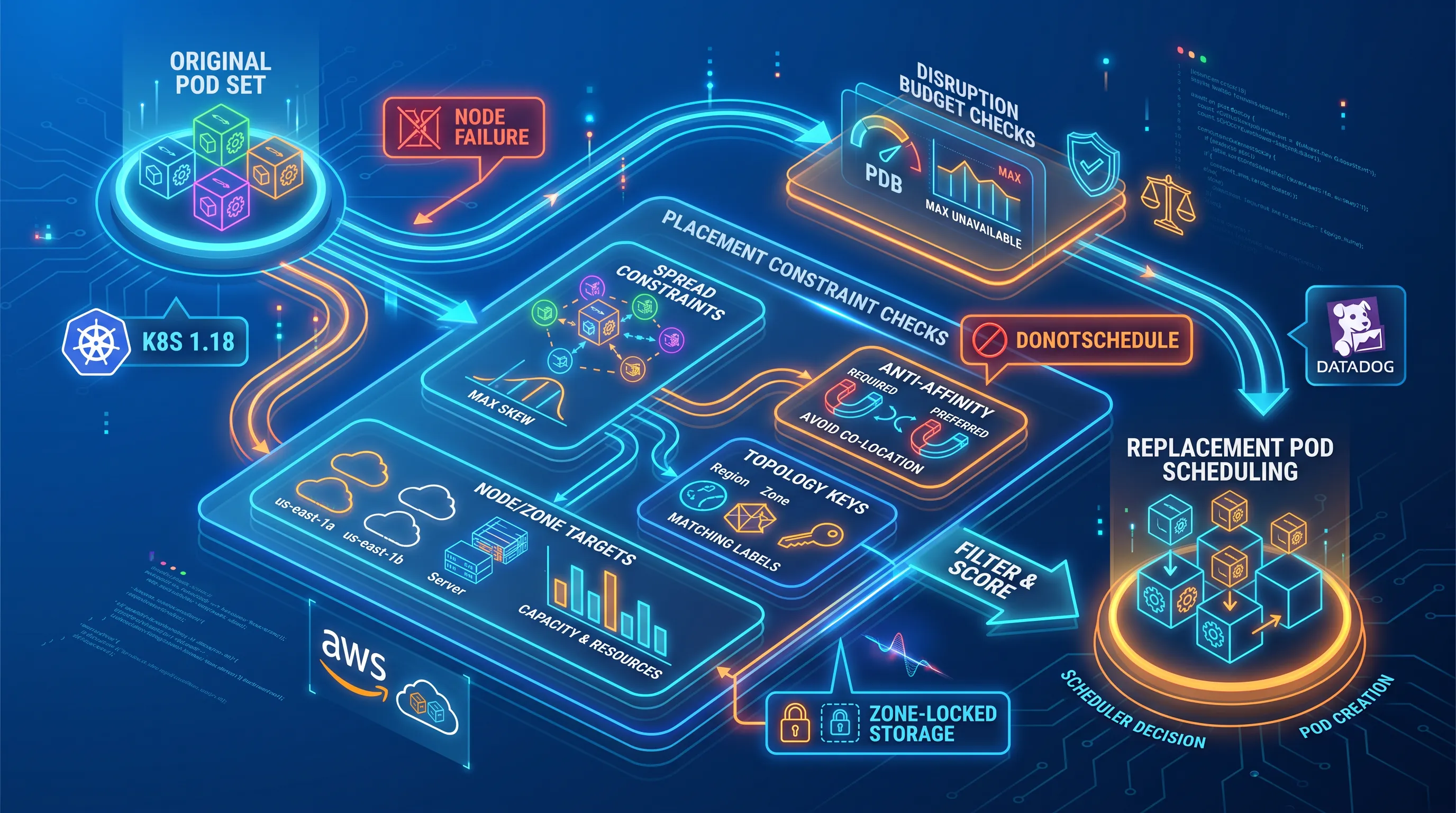
Budgets count pods without placing them. Eight replicas on one node satisfy minAvailable: 6 perfectly right up until that node goes away, which is why placement is a separate control that has to be configured alongside the Kubernetes PDB.
Topology spread constraints are the mechanism. You define a topology key, a max skew, and a policy for what the scheduler does when the constraint can't be met, and AWS prescriptive guidance recommends combining zone and node spreading for exactly this reason. Pod anti-affinity does similar work with coarser control, and it predates spread constraints, which the Kubernetes project introduced as a more expressive Pod-level API in 1.18.
Strict placement rules and tight budgets interact badly, and the failure mode is a replacement pod stuck in Pending while the drain waits for it. The usual causes:
-
A hard spread rule with whenUnsatisfiable: DoNotSchedule when the target zone has no spare node capacity
-
Node taints that the replacement pod doesn't tolerate, so the scheduler has fewer candidate nodes than you assumed
-
Zone-locked storage, because an EBS volume is a single-zone resource and a pod gets stuck Pending when no node exists in the volume's zone
For multi-zone clusters, Datadog's debugging guidance points at WaitForFirstConsumer as the storage class binding mode that avoids provisioning a volume in a zone the scheduler can't use. Set it before you discover the problem during an upgrade.
Test maintenance safely
Validate the Kubernetes PDB in pre-production against the same replica counts and node sizes you run in production, because a budget tested at 10 replicas tells you nothing about its behavior at the autoscaler floor of 3.
Run the sequence in order:
-
Read the status. kubectl get pdb -n shows ALLOWED DISRUPTIONS and CURRENT. If allowed disruptions is zero at steady state, stop and fix the budget before testing anything else.
-
Evict one pod through the API. Confirm the eviction returns 200 and the pod passes readiness. Time it.
-
Scale the workload to its HPA minimum and read the status again. This is the test that catches the minAvailable vs maxUnavailable mistake, because the floor-based budget drops to zero allowed disruptions while the ceiling-based one doesn't.
-
Drain a test node with kubectl drain --ignore-daemonsets and watch whether replacements land or stall.
-
Record recovery time from eviction to ready, and compare it against your maintenance window divided by node count.
That last number is the one to bring to the upgrade review. As a simplified sequential estimate, if a replacement takes 90 seconds and your budget permits one eviction at a time across 40 pods, the drain portion alone runs about an hour (40 × 90 seconds). Treat that as a planning baseline, not an expected maintenance duration. Total drain time also depends on pod placement, concurrent evictions across workloads, scheduling, termination grace periods, and how quickly replacements become ready. Passing this sequence shows the budget behaves as intended, but it doesn’t guarantee safe maintenance on its own. Replica placement, infrastructure capacity, and failure-domain redundancy have to be validated alongside it.
Troubleshoot stuck disruptions
When a drain hangs, work the list in order.
Find the blocking Kubernetes pod disruption budget first. Google's documentation for GKE includes a JSONPath query that lists every PDB with disruptionsAllowed at zero across all namespaces, and it works on any conformant cluster. Then run kubectl describe pdb on the result and compare status.currentHealthy against status.desiredHealthy.
If currentHealthy is lower than expected, the problem is upstream of the budget. Check whether the selector still matches the pods you think it does, because a label change during a refactor leaves a budget pointing at nothing or at the wrong set. Check for pods in Pending and read their events, since scheduling failures name the constraint that blocked them: insufficient CPU or a taint without a toleration.
For autoscaler-driven drains, read the autoscaler's own reasoning. GKE emits no.scale.down.node.pod.not.enough.pdb and names the blocking pod in the event, which saves you the correlation work. Finally, check whether the stuck pods are running but unready, because that's the case unhealthyPodEvictionPolicy: AlwaysAllow was designed to unblock, and leaving the default in place means a crashlooping application can hold a node hostage.
Know your platform's escape hatch before you need it. GKE respects budgets and grace periods during node upgrades for a maximum of one hour and then force-evicts. Azure Kubernetes Service takes a different route by quarantining the undrainable node with a Cordon behavior and leaves it to you to resolve. Neither outcome is one you want to meet unprepared.
Monitor Kubernetes PDB health
Budgets drift because workloads change and budgets don't. Monitoring closes that gap, and kube-state-metrics already exposes what you need: current healthy, desired healthy, expected pods, and pod disruptions allowed as stable gauges per budget.
Alert on four conditions. Disruptions allowed sitting at zero for 30 minutes means a drain touching that workload would block, which matters most ahead of planned maintenance. A budget that hasn’t permitted a single disruption in 24 hours is a condition to investigate, not proof of misconfiguration. Zero allowed disruptions can be deliberate, particularly for sensitive stateful workloads, or it can reflect degraded application health. Alert when it persists unexpectedly, and judge it against the workload’s criticality and your approved availability policy.
Current healthy below desired healthy for 10 minutes points to an application problem the budget is now amplifying. And repeated autoscaler scale-down failures attributed to a specific Kubernetes PDB mean you're paying for nodes you can't release.
Two reviews belong in the operating rhythm. Run a coverage check that lists critical workloads with no Kubernetes PDB at all and budgets whose selectors match zero pods, both of which are silent failures. Then make a PDB status check a gate in the maintenance runbook, so nobody starts a node pool upgrade without knowing which budgets will block it.
Ownership has to be explicit. The service team sets the availability threshold because they know the capacity math, and the platform team owns the policy that validates it. A ValidatingAdmissionPolicy in Common Expression Language (CEL) can reject mistakes that are visible in the PDB itself or in parameters you supply, such as a minAvailable above a replica count passed in as a parameter. It can’t look up a Deployment’s live replica count on its own. To compare budgets against live replicas, use a custom admission webhook or a GitOps/CI validation step, and keep the drift check from the monitoring section running between deployments. Either way, catching these mistakes at write time beats discovering them halfway through a drain.
Build an implementation roadmap
Start with an inventory. List every Kubernetes pod disruption budget in the cluster alongside its selector and its current allowed disruptions, then list the critical workloads that have no budget at all. That single table surfaces more risk than a week of discussion, because it shows both the budgets that block maintenance and the services running without protection.
Rank what you find by workload criticality. A payment service with a budget that permits zero evictions outranks a batch worker with a stale selector, even though the selector takes two minutes to correct. Then test the prioritized corrections against the validation sequence above, in pre-production, at the autoscaler floor.
Keep Kubernetes maintenance predictable. ABS Technologies helps organizations assess Kubernetes availability risks, optimize disruption policies, and establish proactive monitoring and maintenance practices through managed cloud and DevOps services. If your upgrades keep stalling or you don’t know which budgets would block the next one, talk to our team about assessing current coverage and building a roadmap you can execute.