A glowing futuristic microchip lights up in blue and orange on a dark circuit board surrounded by electronic components and illuminated circuitry patterns.

The Danger of the Franken-Stack: How Patchwork IT Blocks Growth - And How Technology Business Solutions Fix It

Most SMBs run on a messy mix of tools that only work “well enough.” When things break, this “Franken-Stack” triggers outages, security gaps, and compliance risks. Here’s how to replace it with a clean, scalable foundation.

Content authorBy Irina BaghdyanPublished onReading time5 min read

What You’ll Learn

You’ll learn how a unified core for email, collaboration, and storage closes blind spots, how modern endpoint protection and SSO block most threats, and how cloud-native disaster recovery gets you back online in minutes. We’ll also show where technology business solutions provide ongoing optimization so your team can focus on growth.

Why Do SMBs End Up With a Franken-Stack?

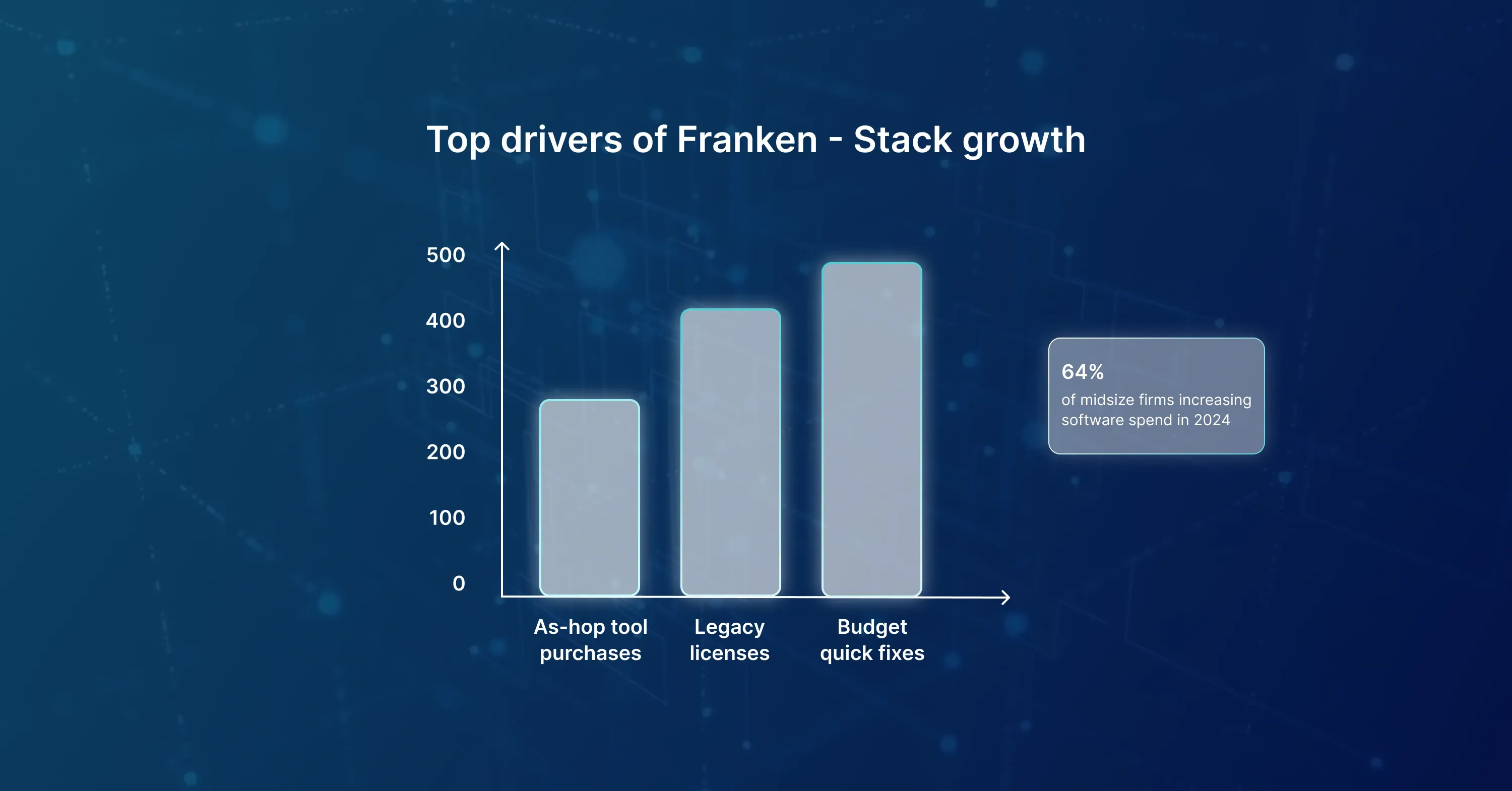
A futuristic bar chart showing three bars - ad-hoc tool purchases, legacy licenses, and budget quick fixes - with a note that 64% of midsize firms plan to increase software spend in 2024.

Most Franken-Stacks form slowly. A department grabs a SaaS trial, another installs an on-prem server from a past era, and soon nobody remembers who owns what.

  • New hires buy “just one” tool to finish a project
  • Legacy licenses keep rolling because canceling feels risky
  • Budget cycles favor quick fixes over long-term strategy

A recent 2025 survey shows 64% of midsize companies will boost software spend in 2024. Spending without a plan only makes the stack bigger.   The takeaway: growth amplifies the mess unless you set a clear foundation. For a modern blueprint on how cloud-first strategies and elastic architectures can replace this legacy approach, explore Cloud Services and DevOps.

Hidden Costs and Risks: Compliance, Security, and Lost Productivity

Adding another point solution may feel cheap, but the real bill shows up later.

  • Compliance gaps: Old email servers rarely meet GDPR or HIPAA logging rules
  • Security holes: 29% of enterprises list cyber threats as a top fear, according to Gartner
  • Lost hours: Switching between six interfaces can waste 5–10 minutes per task

Each forgotten plug-in is a door for attackers. When an audit hits, piecing logs across multiple apps can take days. Staff frustration rises, turnover follows, and growth stalls.   Bottom line: the patchwork costs more than ripping it out and rebuilding. To explore proactive security strategies, continuous monitoring, and predictable cloud maintenance, see Information Security.

Building a Unified Backbone: Email, Collaboration, and File Storage

A solid core platform replaces scattered shares and endless forwarding chains. Think Microsoft 365 or Google Workspace, both packed with enterprise software grade controls. Key Benefits

  • One admin console to set retention, MFA, and region rules
  • Real-time coauthoring eliminates version chaos
  • Tiered access makes client data isolation simple

A leading provider of Managed IT Services can migrate mailboxes and drives with minimal downtime, then enforce automatic backups. With a single pane of glass, your team works faster and auditors smile.   The lesson: start with the backbone, everything else plugs in cleanly later.

Modern Endpoint Protection and Single Sign-On: A One-Two Security Punch

Every laptop, phone, or browser tab is a potential breach point. Advanced agents powered by AI spot abnormal behavior in seconds.

What Modern Protection Looks Like

  • AI-driven malware detection that learns locally
  • Device encryption tied to cloud keys
  • Automated patching windows outside work hours

Pair that with SSO and users log in once to reach email, ERP, and automation tools. You cut credential fatigue and slash phishing success rates.   Transitioning from five passwords per user to one secure identity sounds small but is massive: fewer reset tickets, tighter logs, and instant off-boarding when someone leaves.   For best practices on embedding security, compliance by design, and cloud-native protection into your stack, review Information Security services.

Right-Sizing and Ongoing Support: Managed Services That Grow With You

A common fear is overpaying for cloud capacity. Skilled partners watch usage trends and tune instances monthly.

  • Auto-scaling rules keep compute in line with real demand
  • Reserved pricing locks discounts for predictable workloads
  • Quarterly reports flag unused licenses, saving real cash

Large firms see only 31% of expected revenue lift from digital projects, notes McKinsey research. Expert guidance ensures you are not part of that statistic.   The point: technology business solutions are not “set and forget.” Continuous care squeezes every dollar from your stack. For more detail on optimizing resources and managed support, visit Managed IT Services.

Disaster Recovery in Minutes, Not Days

Old tapes and on-prem backup appliances fail when the office floods. Cloud-native recovery spins workloads up in a different zone almost instantly.

Must-Have Elements

  • Immutable snapshots every 15 minutes
  • Cross-region replication
  • Run-book automation that rebuilds networks and firewalls on launch

In a live drill, teams with this setup regained full operations in under 20 minutes. Compare that to legacy restores that can stretch into multi-day outages. Revenue saved often pays for the service many times over.   A robust disaster recovery plan and regular incident drills are hallmarks of Managed IT Services, ensuring your environment stays resilient and recoverable at all times.

How to Start Replacing the Patchwork Today

Change feels heavy, but a phased approach works.

  • Map every tool, license, and shadow IT account
  • Set security and compliance goals, then pick a backbone platform
  • Migrate email and storage first, with limited pilot users
  • Roll out SSO and endpoint agents company-wide
  • Decommission redundant apps and shift funds to continuous support
  • Test disaster recovery quarterly, tune, and document

Automation tools built into modern suites speed each step. Celebrate small wins; momentum matters.

Conclusion

A Franken-Stack feels harmless until a breach, audit failure, or outage hits, then the real price reveals itself. Building on a unified, secure foundation backed by modern endpoint defenses, smart automation, enterprise software controls, and rock-solid disaster recovery turns IT from a risk into an advantage. Your people work faster, your data stays safe, and growth is no longer held back by yesterday’s patchwork.

Each standalone tool introduces its own login, patch schedule, and security model. Attackers exploit the weakest point. Without centralized monitoring, you may never see the breach until data is gone.

Typical projects run four to eight weeks. Small pilots can start within days, while full email and file migrations take longer as data is verified and users are trained.

The subscription line item may look higher, but you save on duplicate licenses, support overhead, and breach risk. Most firms break even within the first year and then enjoy compounding savings.

A managed partner sizes the cloud environment, oversees the migration, tunes security policies, and stays on call afterward. Their experience shortens timelines and avoids common pitfalls. See [Managed IT Services](https://abs.am/en/services/managed-it-services/) for more information.

Yes. Snapshots and infrastructure-as-code let you restore whole servers in minutes. Tape or disk backups often require manual transport and hardware rebuilds, which can stretch into days. To see how a next-generation cloud foundation supports business continuity, explore [Be Cloud: The Next-Gen Platform for Scalable Business](https://abs.am/be-cloud-the-next-gen-platform-for-scalable-business).

Schedule a Meeting

Book a time that works best for you and let's discuss your project needs.

You Might Also Like

Discover more insights and articles

The image depicts an advanced enterprise AI chip embedded in a digital circuit board, visualizing neural network processing and high-performance computing architecture

Cyber-Resilience: Why 2026 Boards are Trading Protection for Immunity

Modern boards are staring at a blunt truth: threat actors now move faster than any human response plan. A single ransomware strike can wipe decades of data, paralyze revenue, and sink market value overnight. Buying more perimeter tools will not calm the boardroom. Ensuring the business never stops will.

Below is a practical roadmap for CISOs, IT Directors, and Business Continuity Managers who need to move their IT and business services from brittle protection to digital immunity before the next quarterly review.

The image shows a high-performance AI processor chip on a circuit board with flowing data streams, representing neural computing and modern enterprise IT architecture

The Sovereignty Shift: Navigating Data Residency and Corp IT Solutions in a Borderless Cloud

In 2026, the question is no longer just whether your data is in the cloud, but exactly which legal jurisdiction that cloud inhabits. For Chief Information Officers and Risk Officers, particularly in regions like the Gulf Cooperation Council (GCC) and Canada, the physical location of a server now carries as much weight as its uptime or security.

This article examines the critical transition from general public cloud strategies to the era of the Sovereign Cloud. We will explore how mid-market firms and large enterprises can navigate strict data laws in Saudi Arabia, the UAE, and beyond. You will learn how to design hybrid architectures that keep sensitive information within national borders while still leveraging global innovation, ensuring yourdigital enterpriseremains compliant and competitive.

Futuristic digital network illustration showing cloud infrastructure with glowing data flows, interconnected circuits, and real-time processing across a modern IT system

How to Build a Cloud Services Support Model That Scales

Cloud leaders love the flexibility of the public cloud, yet many still struggle to support thousands of fast-changing workloads without hiring armies of engineers. By 2026, operational excellence will be judged by a single metric: the Engineer-to-Instance ratio. The lower the ratio, the more resilient the platform—and the more strategic the IT budget.

Below is a practical, end-to-end playbook for CTOs, CIOs, and FinOps leaders who want a cloud services support operation that grows automatically with the business instead of linearly with headcount.

Futuristic cloud security and compliance dashboard visualizing FinOps and GreenOps metrics, cost optimization, and energy-efficient cloud infrastructure

The Green Cloud: Why Carbon-Aware DevOps is the Secret to 2026 Compliance

New EU and US climate rules are about to turn every container image, lambda call, and SQL query into an auditable emission line item. Platform teams must now prove that the way they build and run software is affordable and planet-friendly, or risk fines and reputational damage.

This article explains how carbon-aware DevOps connects cloud cost management (FinOps) with environmental accountability (GreenOps), why the two goals are inseparable, and what engineers need to change before the 2026 reporting deadlines arrive.